In My Bedroom: Crying Out for HDTV? and More on Pioneer's Elite PRO-1130HD I said I hanker after a Pioneer Elite PRO-1130HD 50" plasma HDTV for my bedroom. One reason is that it has this supposedly extra-special "ISF C3" calibration capability. Pioneer documents it here. From the page at Pioneer's web site, I can see that I was wrong about a couple of things.
First, "C3" stands for "Custom Calibration Configuration," not "Colors: 3" — such as the three red, green, and blue color primaries used in television images. ("ISF" stands for Imaging Science Foundation, trainers of technicians who can come to your home with color meters and other instruments and professionally calibrate your TV.)
Second, this ISF C3 capability is separate from the user's ability to adjust the Pioneer's color temperature manually as discussed here ... where Al Griffin, who reviewed the set for Sound & Vision magazine, wrote:
"The Pioneer PRO-1130HD's Mid-Low color-temperature mode measured close to the 6,500-K standard, but the set displayed a mild shift toward green at both ends of its grayscale. I was able to correct this, however, using the high and low red, green, and blue adjustments in the Manual color temperature mode submenu without having to enter any special service menus."
I thought, wrongly, that this was the vaunted ISF C3 calibration capability in action. But, no. ISF C3 calibration is not even discussed in the Pioneer user manual for the PRO-1130HD, which I downloaded from here. It's not something the user can do by himself at all.
Rather, says Pioneer's web site, "When you buy a Pioneer Elite PureVision plasma television, you can arrange with the Elite dealer to have a trained ISF professional come to your home to adjust the lightness-to-darkness (contrast), tint, sharpness, various color levels and other settings to make the image as bright, sharp and accurate as it can be for your TV room."
Among the "other settings" is "a detailed gamma selection with eight steps for a high level of display accuracy." (Gamma is in effect a mathematical function, a curve on a pair of graphical axes which can make the image more or less dramatic, in terms of its contrast.)
And, with ISF C3 calibration, the Pioneer Elite is "set for nighttime and daytime viewing so the television adjusts depending on how much light is shining into the room." There are apparently even "Day" and "Night" buttons on the remote which are enabled only when ISF C3 calibration is done.
The ISF C3 calibration capability makes the Pioneer Elite plasmas easier and faster to calibrate than ordinary TVs, seemingly. It permits the calibration of such things as gamma that often are not accessible to the professional calibrator at all. It can lock in certain user preferences, such as that for sharpness, that ordinarily might not be able to be locked in. And it offers (at least) two locked-in ambient lighting presets, one for day and one for night.
As a result, Pioneer claims, "It takes about 20 minutes per source to calibrate the set, so if you have a cable box, DVD player and videogame machine, you can plan on those three sources taking about 60 minutes to complete." That's a lot quicker than your average calibration, I imagine, which can take (so I've heard) an hour or more per source device.
"The cost for this service," accordingly, says Pioneer, "can range quite a bit depending on the experience level of your calibrator, but expect to spend about $350-$400 for a thorough calibration." From what I know about the subject, that is slightly less than you might pay to calibrate three sources on any other plasma TV. For example, the calibration FAQ here says the price to calibrate a run-of-the-mill plasma for one source/scan rate is $325. Add $75 for each additional source. That makes a three-source plamsa calibration cost $475.
So you can't really expect to save a lot of money. And forget doing the whole ISF C3 calibration business yourself. For one thing, you'd need the secret code for getting into the calibration menu in the first place — much as you'd need a secret code to get into the service menu on an ordinary plasma. You'd need professional instrumentation. You'd need to know exactly what you're doing, from a conceptual standpoint. You'd need a service manual or some other source of specific information as to how to calibrate this set.
I personally am not sure I really even care, all that much, that ISF C3 calibration is not a thing users can do on their own on the Pioneer Elites. Apparently, the user-accessible Picture: PRO Adjust: Color Detail: Color Temp: Manual submenu (I'm perusing page 60 in the manual now) is all one actually needs to get an excellent grayscale. Meanwhile, setting the Pure mode for AV sources (p. 58) is apparently the key to getting the three primary-color chromaticities just right (which the manual is mum about, but which various reviewers have commented on). With both of these in force, who needs calibration?
Friday, June 16, 2006

Thursday, June 15, 2006
More on Pioneer's Elite PRO-1130HD
 |
| Pioneer Elite PRO-1130HD |
I didn't actually ask the In Stock? question at Tweeter, so I don't know about that. I did visit another store, the high-end emporium called Gramophone, where I was told it is impossible to stock this model right now, pending the arrival of the new Pioneer Elite 1080p plasma. I don't really see what the one as to do with the other, but never mind.
Would I be better off buying online? Apparently not. Pricegrabber.com gives me this information indicating that my lowest price, shipping included, would be $4,998.
 |
| Axis 8028 |
It also has hidden wheels in the rear, supposedly making it easy to pull the unit out to work behind it.
It is 48" wide (perfect) by 27" deep (fine). It's height is a seemingly ideal 32.5", which puts the top of the 28.2"-high screen at about 60" — plus however many inches of height the TV's tabletop stand adds.
The Tweeter guy showed me the Yamaha YSP1 digital sound projector, the big brother of the YSP-800 I'm envisioning. I didn't pin down whether Tweeter sells the latter, or for how much. Best Buy does sell it, for around $800.
 |
| Polk Audio PSW303B |
The Tweeter guy also said a minimal delivery/installation charge (including putting together the shelf unit) would probably run me $150. That doesn't include anything other than hooking up the TV proper — not the YSP-800 nor any other gear — after installing it on its tabletop stand. Wall mounting would be considerably extra.
I forgot to ask about 0% financing: does Tweeter offer it; if so, for how long before interest is owed?
Then, of course, there are the necessary connecting cables. You can easily spend $150 at Best Buy for an HDMI cable. I'd probably need two of those, if not right away, at least eventually. But HDMI prices are more in the $30 range at Pacific Custom Cable. I've bought from them in the past, with no complaints. Doubtless, I'd also need some other doodads — so say $250 for cables and doodads, all told.
$5,000 for the TV. $900 for the furniture. $800 for the surround sound unit, plus another $300 for the privilege of hearing deep bass. $250 for cables and doodads. $150 for the delivery and installation. That comes to $7,400 before tax. With 5% added for sales tax, it's about $7,770!
Gulp!
Monday, June 12, 2006
My Bedroom: Crying Out for HDTV?

I've been putting off getting a new TV for the master bedroom of my house. Having sold my long-in-the-tooth Sony Trinitron XBR 27" CRT last year to make way for one, I have space for a set that is between 42" and 50" diagonally ... but what TV should I get?
I'd prefer a flat panel with a small footprint, made even smaller by possibly wall mounting it. A rear projector would likely occupy the entire top of its stand, front to back, leaving little room for home-theater speakers. My bedroom doesn't offer a lot of alternative front speaker positions other than right on the same stand (or, again, wall mounts).
Assuming I'm looking for a flat-panel TV and not a rear projector, I figure the model to beat could be the Pioneer Elite PRO-1130HD 50" plasma. Despite its hefty list price, $5,500, Randy Tomlinson's review in the March/April 2006 The Perfect Vision glows with admiration for it. Tomilinson says, "All things considered (except price), I haven't been more impressed with any plasma TV ... ."
There is also a 43" in the same line, the Elite PRO-930HD (MSRP $4,500). I'd prefer the larger, but might settle for the smaller to save $1,000.
Pioneer builds into these models such things as a "Crystal Emissive Layer," which, according to this online article, is "sandwiched between the plasma glass and individual light cells to increase the speed at which each cell is charged and discharged, resulting in better blacks with more details in dark scenes as well as an overall reduction in energy consumption."
For most plasmas — with the apparent exception of those from Panasonic and now Pioneer — the depth of blacks and the adequacy of shadow detail has always been Achilles' heel number one. But Tomlinson writes, "This Pioneer's black level passed the home-theater [i.e., totally unlit room] test as well as any other current plasma — Panasonic included. Blacks were about 75% lower than the 55-inch Hitachi [the very good plasma TV being used as a reference system]."
As for color renditions, these Pioneer Elite is virtually bang-on the HDTV standard's chromaticity specs for red, green, and blue primaries. That's when using PURE mode, one of five user-adjustable presets, others of which include STANDARD, GAME, and MOVIE. (In other preset modes, the PRO-1130HD apparently oversaturates greens and undersaturates reds, according to Tomlinson's review.)
Inaccurate primaries are not at all unusual. What is unusual in this TV is a user-selectable mode that gets the chromaticities right. Apparently plasmas, if they have enough smarts built into them, can overcome the off-standard native hues of their screen phosphors.
One other factor is crucial to getting colors right: a neutral grayscale that puts the "color of white" just where it belongs, at the chromaticity known as D65. D65 is sometimes (slightly erroneously) identified with the D6500 or 6500K "color temperature," but whatever it's called, the accuracy of a TV's white point is important. All colors are in effect computed from four anchor points: the white point and the three primaries. So if the white point is wrong, all the computations are wrong.
Few TVs get D65 right, right out of the box, without professional calibration. The Pioneer Elite gets tolerably close. Tomilinson, for instance, puts its MID-LOW color temperature setting at "about 6300K."
At that setting, he says there is also (alas) a "slightly greenish error." It, I assume, is something like that on my Hitachi 32HDT50 plasma in the basement — see Since When Is Black and White Green? The fact of this slight greenishness illustrates exactly why specifications of "color temperature" don't tell a TV's whole story, grayscale-wise, and chromaticity coordinates should be cited instead. The greenishness doesn't come from the difference between 63ooK and 6500K, as color temperatures per se. It comes from the white point being shifted, whatever its color temperature, away from true D65 and in favor of green.
For every chromaticity has its own "correlated" color temperature. This is, on the so-called "Planckian locus" or "black-body curve," the nearest "white" point to the chromaticity in question.
That curve is the graph of all whites emitted by ideal "black-body radiators" — special metal objects also called "illuminants" — that are heated to various absolute temperatures which are measured in Kelvins or K units. The chromaticity termed D65, though it is not smack on the Planckian locus, is quite close by. Its nearest black-body-curve point has the color temperature 6500K. (Actually, 6504K, but who's counting?)
But there are many other chromaticity points that have the same color temperature, and these can look noticeably greenish. For color temperature is a line on the CIE chromaticity graph, not a point. Each such line line crosses the black-body curve at a point which defines the line's color temperature. But the line is not a single chromaticity point. D65 is — as is, say, point D on the diagram to the right. That point is near the 6500K line, so that is its nominal color temperature.
(This diagram furnishes a workable definition for the term "chromaticity." It's any color within or on the edge of the shark-fin-shaped area of the CIE diagram, and it is exactly specified by a pair of coordinates. For example, x= 0.312713 and y=0.329016 are the coordinates of D65.)
The Pioneer Elite's white point at its MID-LOW color temperature setting, accordingly, is apparently shifted slightly away from D65 in the direction of green. But not to worry. This TV has a built-in "ISF C3" calibration capability that apparently lets you adjust the relative contributions of red, green, and blue color primaries to white, at both low and high brightness levels.
This is what professional calibrators, trained by the Imaging Science Foundation ("ISF"), do. They adjust the three primary colors ("C3") to produce whites and grays as close to perfect as can be achieved at every level along the available brightness scale from near-black dark grays on up to near-white light grays, and finally to so-called "reference white." With these Pioneer sets, you can do the calibration yourself!
ISF C3 is a function, I gather, of a particular submenu of the Pioneer's MANUAL color temperature mode — for more, see the technical discussion here, part of Al Griffin's review of the PRO-1130HD for Sound & Vision magazine, online here. Griffin writes: "The Pioneer PRO-1130HD's Mid-Low color-temperature mode measured close to the 6,500-K standard, but the set displayed a mild shift toward green at both ends of its grayscale. I was able to correct this, however, using the high and low red, green, and blue adjustments in the MANUAL color temperature mode submenu without having to enter any special service menus."
"After calibration," Griffin continues, "grayscale tracking was ±100 K from 20 to 100 IRE - an above-average level of performance." Griffin is talking about the IRE scale of brightness that runs from 0 (or sometimes 7.5) IRE for pure black to 100 IRE for reference white. 20 IRE is a very dark gray.
(Yet another useful review of this Pioneer Elite HDTV can be found here.)
Of course, to get the calibration absolutely right, you'd need professional instruments. Still, it's nice to know that you don't have to go into any super-secret "service menu" to play around with seat-of-the-pants calibration efforts, maybe messing up some important settings accidentally and irretrievably.
By the way, the PRO-1130HD also has still other user-adjustable color settings that tweak not only reds, greens, and blues, the three color primaries, but also the three color secondaries — yellows, magentas, and cyans — thereby to render every available hue just the way you want it. That's in addition, of course, to the ordinary color and tint controls.
To be quite frank, I'm not at all sure why taking control over the secondary colors is of great value. In theory, if you have the three primaries and the white reference right, all the other colors should fall right into place.
At any rate, what with spot-on primaries, a user-calibratable grayscale, and all the other user adjustments for color, one ought to get some stunning renditions. Add to that the excellent blacks and dark grays, and a superb picture is truly within reach.
And the renditions are indeed stunning, these reviewers say. Furthermore, the picture is easy to tailor. Griffin liked:
Other features I especially covet on the Pioneer PRO-1130HD include the two digital HDMI inputs (even more would be appreciated) and its separate media receiver, detached from the display panel, to which various source devices' input cables run. That makes it easy to mount the display on the wall, if desired, since the cables between the receiver and the wall-mounted display panel don't change when you, say, hook up a new DVD player.
What I don't like about the PRO-1130HD — in addition to its steep price, that is — is that it's not 1080p. It's screen contains 1,280 pixels across, the same as 720p. Its 768 pixels vertically are just a tad better than 720p resolution. That's good, but not great.
Of course, as Tomlinson points out in his review, "at distances of 12 feet or more, you may not see any difference" between a 720p/768p 50" HDTV and a true 1080p. I'd be almost exactly 12 feet from my display as I prop myself up in bed to ogle it.
Actually, according to a "Tech Talk" piece by David Ranada in the same Feb./Mar. '06 issue of Sound & Vision, "Maxing Out Resolution," if you sit 10 feet or more from a 720p 16:9 display, your eyes are starting to lose picture detail. Or so the graph which Ranada provides suggests.
The article extends Ranada's "The Progressive Tradeoff" discussion of the previous month, which said, "Unless you have fighter-pilot vision — markedly better than the standard 20/20 — your eyes will be able to resolve an object only if it extends over 1/60 of a degree (1 arc-minute) or more, which is what a 1-inch wide object appears like when seen from 100 yards away."
That's 1/60 of a degree at the retina of your eye, or 1/60 of a degree "out there" in your field of view. Any detail which subtends a smaller arc than that will simply not register. So at a viewing distance of just short of 9 feet, "a 50-inch (diagonal) 720-line widescreen HDTV will give you all the resolution you can use."
Yes, there's a minor discrepancy here. One time, the magic distance seems to be 9 feet for 720p; the next time, its 10 feet. But the principle is clear. If you sit too close for the screen's resolution, the image starts to appear soft and it becomes possible to notice individual pixels. If you sit too far away, you effectively leave picture detail behind at your retinas.
According to Ranada's graph, the magic distance for a 50" 1080i/p 16:9 TV is about 6 to 7 feet. Any seating distance beyond that loses effective resolution. Somewhere between 9 and 10 feet, you can no longer tell the difference between 1080i/p and 720p.
Moral: if I put a 50" plasma in my bedroom 12 feet from my accustomed propped-up-in-bed viewing position, it might as well be 720p as 1080p.
Word has it that Pioneer and rival makers are set to introduce true 1080p plasma HDTVs real soon now. In fact, for a cool $10,000, I could buy Pioneer's 50" Elite PRO-FHD1 monitor, "available June 2006," about which I know very little as yet.
I do know that it's not equipped with a digital television tuner, as the PRO1130HD is — which is why it's a "monitor." (I care little about an onboard tuner, since I get my TV signals from cable.) It has the ISF 3C calibration capability, I see.
I assume that as 1080p plasmas come, they'll be even pricier than the PRO-1130HD. (In fact, Pioneer may at that point be forced to drop its price on what will be a last year's model.) I also assume Pioneer's 1080p plasmas will include at least one model with the picture quality and advanced features of the PRO-1130HD, making that model the one to beat in my bedroom-TV search!
What about sound, though? I don't fancy cluttering up my already-cluttered bedroom with a full-blown surround system requiring a minimum of 5 speakers plus subwoofer. A better solution appears in the selfsame Feb./Mar. '06 issue of Sound & Vision, a "Quick Take" on One-Box Surround: Yamaha YSP-800 Sound Projector. (The Yamaha web site says this about the unit.)
This is, in fact, a 1-piece "digital sound projector" which, when paired with a powered subwoofer, gives you close to a 5.1-speaker audio experience. About 6" high and less than 32" wide, it can be placed on a shelf in front of a flat-panel display, or on a shelf below it, or (with optional wall-mounting bracket) on the wall above it. Like a digital A/V receiver, it receives audio inputs from various source devices such as a DVD player or cable-TV box. It processes them, amplifies them, and plays them through an array of 21 tweeters and 2 woofers. (The sound intended for the subwoofer is output on its own dedicated connection.)
It accepts both analog stereo and digital audio inputs, either optical or coaxial. "Sound beams" are derived, some of which are bounced off the walls of the room to simulate surround sound.
The reviewer, Ken C. Pohlmann, says the result is quite close to 5.1 surround, except that no sound comes from in back of you — only from the sides. I can live with that.
I'd prefer a flat panel with a small footprint, made even smaller by possibly wall mounting it. A rear projector would likely occupy the entire top of its stand, front to back, leaving little room for home-theater speakers. My bedroom doesn't offer a lot of alternative front speaker positions other than right on the same stand (or, again, wall mounts).
Assuming I'm looking for a flat-panel TV and not a rear projector, I figure the model to beat could be the Pioneer Elite PRO-1130HD 50" plasma. Despite its hefty list price, $5,500, Randy Tomlinson's review in the March/April 2006 The Perfect Vision glows with admiration for it. Tomilinson says, "All things considered (except price), I haven't been more impressed with any plasma TV ... ."
There is also a 43" in the same line, the Elite PRO-930HD (MSRP $4,500). I'd prefer the larger, but might settle for the smaller to save $1,000.
Pioneer builds into these models such things as a "Crystal Emissive Layer," which, according to this online article, is "sandwiched between the plasma glass and individual light cells to increase the speed at which each cell is charged and discharged, resulting in better blacks with more details in dark scenes as well as an overall reduction in energy consumption."
For most plasmas — with the apparent exception of those from Panasonic and now Pioneer — the depth of blacks and the adequacy of shadow detail has always been Achilles' heel number one. But Tomlinson writes, "This Pioneer's black level passed the home-theater [i.e., totally unlit room] test as well as any other current plasma — Panasonic included. Blacks were about 75% lower than the 55-inch Hitachi [the very good plasma TV being used as a reference system]."
As for color renditions, these Pioneer Elite is virtually bang-on the HDTV standard's chromaticity specs for red, green, and blue primaries. That's when using PURE mode, one of five user-adjustable presets, others of which include STANDARD, GAME, and MOVIE. (In other preset modes, the PRO-1130HD apparently oversaturates greens and undersaturates reds, according to Tomlinson's review.)
Inaccurate primaries are not at all unusual. What is unusual in this TV is a user-selectable mode that gets the chromaticities right. Apparently plasmas, if they have enough smarts built into them, can overcome the off-standard native hues of their screen phosphors.
One other factor is crucial to getting colors right: a neutral grayscale that puts the "color of white" just where it belongs, at the chromaticity known as D65. D65 is sometimes (slightly erroneously) identified with the D6500 or 6500K "color temperature," but whatever it's called, the accuracy of a TV's white point is important. All colors are in effect computed from four anchor points: the white point and the three primaries. So if the white point is wrong, all the computations are wrong.
Few TVs get D65 right, right out of the box, without professional calibration. The Pioneer Elite gets tolerably close. Tomilinson, for instance, puts its MID-LOW color temperature setting at "about 6300K."
At that setting, he says there is also (alas) a "slightly greenish error." It, I assume, is something like that on my Hitachi 32HDT50 plasma in the basement — see Since When Is Black and White Green? The fact of this slight greenishness illustrates exactly why specifications of "color temperature" don't tell a TV's whole story, grayscale-wise, and chromaticity coordinates should be cited instead. The greenishness doesn't come from the difference between 63ooK and 6500K, as color temperatures per se. It comes from the white point being shifted, whatever its color temperature, away from true D65 and in favor of green.
For every chromaticity has its own "correlated" color temperature. This is, on the so-called "Planckian locus" or "black-body curve," the nearest "white" point to the chromaticity in question.
That curve is the graph of all whites emitted by ideal "black-body radiators" — special metal objects also called "illuminants" — that are heated to various absolute temperatures which are measured in Kelvins or K units. The chromaticity termed D65, though it is not smack on the Planckian locus, is quite close by. Its nearest black-body-curve point has the color temperature 6500K. (Actually, 6504K, but who's counting?)
 |
| CIE Chromaticity Diagram |
(This diagram furnishes a workable definition for the term "chromaticity." It's any color within or on the edge of the shark-fin-shaped area of the CIE diagram, and it is exactly specified by a pair of coordinates. For example, x= 0.312713 and y=0.329016 are the coordinates of D65.)
The Pioneer Elite's white point at its MID-LOW color temperature setting, accordingly, is apparently shifted slightly away from D65 in the direction of green. But not to worry. This TV has a built-in "ISF C3" calibration capability that apparently lets you adjust the relative contributions of red, green, and blue color primaries to white, at both low and high brightness levels.
This is what professional calibrators, trained by the Imaging Science Foundation ("ISF"), do. They adjust the three primary colors ("C3") to produce whites and grays as close to perfect as can be achieved at every level along the available brightness scale from near-black dark grays on up to near-white light grays, and finally to so-called "reference white." With these Pioneer sets, you can do the calibration yourself!
ISF C3 is a function, I gather, of a particular submenu of the Pioneer's MANUAL color temperature mode — for more, see the technical discussion here, part of Al Griffin's review of the PRO-1130HD for Sound & Vision magazine, online here. Griffin writes: "The Pioneer PRO-1130HD's Mid-Low color-temperature mode measured close to the 6,500-K standard, but the set displayed a mild shift toward green at both ends of its grayscale. I was able to correct this, however, using the high and low red, green, and blue adjustments in the MANUAL color temperature mode submenu without having to enter any special service menus."
"After calibration," Griffin continues, "grayscale tracking was ±100 K from 20 to 100 IRE - an above-average level of performance." Griffin is talking about the IRE scale of brightness that runs from 0 (or sometimes 7.5) IRE for pure black to 100 IRE for reference white. 20 IRE is a very dark gray.
(Yet another useful review of this Pioneer Elite HDTV can be found here.)
Of course, to get the calibration absolutely right, you'd need professional instruments. Still, it's nice to know that you don't have to go into any super-secret "service menu" to play around with seat-of-the-pants calibration efforts, maybe messing up some important settings accidentally and irretrievably.
By the way, the PRO-1130HD also has still other user-adjustable color settings that tweak not only reds, greens, and blues, the three color primaries, but also the three color secondaries — yellows, magentas, and cyans — thereby to render every available hue just the way you want it. That's in addition, of course, to the ordinary color and tint controls.
To be quite frank, I'm not at all sure why taking control over the secondary colors is of great value. In theory, if you have the three primaries and the white reference right, all the other colors should fall right into place.
At any rate, what with spot-on primaries, a user-calibratable grayscale, and all the other user adjustments for color, one ought to get some stunning renditions. Add to that the excellent blacks and dark grays, and a superb picture is truly within reach.
And the renditions are indeed stunning, these reviewers say. Furthermore, the picture is easy to tailor. Griffin liked:
- the "solid blacks and impressive shadow detail" that allowed the detection of "fine textures and hues in the grandparents' dark earth-toned clothing" on the Charlie and the Chocolate Factory DVD
- the "very good detail" shown by picture highlights, "with a variety of creamy white tones coming through" to prove that the Pioneer does not "crush" high brighntesses near reference white
- the Pioneer's "exceptionally clean and rich" colors
- the TV's "perfectly natural" skin tones
- its "great job of displaying the high-contrast environment inside a command center" on ABC's 720p broadcast of Alias
- the fact that "the picture was extremely sharp" on that show
- the way the Pioneer "cleanly rendered the medium's grainy image texture" on that show, which is shot on film: not "noisy or [with] a coarse quality," but "at once crisp and smooth"
- the fact that most of the Pioneer's selectable aspect ratio modes, such as 4:3 and Full (16:9), "can be selected for both standard and high-def signals"; a lot of TVs won't let you, say, switch a high-def input's aspect ratio to 4:3 when that's appropriate for the source material
- the TV's noise reduction feature (actually, two of them) which helped 480i inputs from a DVD player, and "even digital stations and HD"; the noise reduction, says Tomlinson, "seems to soften the picture almost imperceptibly," unlike that in many other TVs
- the fact that "the Pioneer was even sharper than the [reference] Hitachi, and yet with less edge enhancement — something I hadn't expected"
- the fact that "each of the factory-preset modes can be customized, and those custom settings are remembered when you switch modes or input sources"
- The Pioneer's "remarkable resistance to false contouring" in the "Anglerfish" scene in Finding Nemo
- though "some dithering noise near black" did show up in Nemo, "dark scenes in Vanilla Sky, which brought on some dreadful artifacts on the Hitachi, were flawless on the Pioneer."
Other features I especially covet on the Pioneer PRO-1130HD include the two digital HDMI inputs (even more would be appreciated) and its separate media receiver, detached from the display panel, to which various source devices' input cables run. That makes it easy to mount the display on the wall, if desired, since the cables between the receiver and the wall-mounted display panel don't change when you, say, hook up a new DVD player.
What I don't like about the PRO-1130HD — in addition to its steep price, that is — is that it's not 1080p. It's screen contains 1,280 pixels across, the same as 720p. Its 768 pixels vertically are just a tad better than 720p resolution. That's good, but not great.
Of course, as Tomlinson points out in his review, "at distances of 12 feet or more, you may not see any difference" between a 720p/768p 50" HDTV and a true 1080p. I'd be almost exactly 12 feet from my display as I prop myself up in bed to ogle it.
Actually, according to a "Tech Talk" piece by David Ranada in the same Feb./Mar. '06 issue of Sound & Vision, "Maxing Out Resolution," if you sit 10 feet or more from a 720p 16:9 display, your eyes are starting to lose picture detail. Or so the graph which Ranada provides suggests.
The article extends Ranada's "The Progressive Tradeoff" discussion of the previous month, which said, "Unless you have fighter-pilot vision — markedly better than the standard 20/20 — your eyes will be able to resolve an object only if it extends over 1/60 of a degree (1 arc-minute) or more, which is what a 1-inch wide object appears like when seen from 100 yards away."
That's 1/60 of a degree at the retina of your eye, or 1/60 of a degree "out there" in your field of view. Any detail which subtends a smaller arc than that will simply not register. So at a viewing distance of just short of 9 feet, "a 50-inch (diagonal) 720-line widescreen HDTV will give you all the resolution you can use."
Yes, there's a minor discrepancy here. One time, the magic distance seems to be 9 feet for 720p; the next time, its 10 feet. But the principle is clear. If you sit too close for the screen's resolution, the image starts to appear soft and it becomes possible to notice individual pixels. If you sit too far away, you effectively leave picture detail behind at your retinas.
According to Ranada's graph, the magic distance for a 50" 1080i/p 16:9 TV is about 6 to 7 feet. Any seating distance beyond that loses effective resolution. Somewhere between 9 and 10 feet, you can no longer tell the difference between 1080i/p and 720p.
Moral: if I put a 50" plasma in my bedroom 12 feet from my accustomed propped-up-in-bed viewing position, it might as well be 720p as 1080p.
Word has it that Pioneer and rival makers are set to introduce true 1080p plasma HDTVs real soon now. In fact, for a cool $10,000, I could buy Pioneer's 50" Elite PRO-FHD1 monitor, "available June 2006," about which I know very little as yet.
I do know that it's not equipped with a digital television tuner, as the PRO1130HD is — which is why it's a "monitor." (I care little about an onboard tuner, since I get my TV signals from cable.) It has the ISF 3C calibration capability, I see.
I assume that as 1080p plasmas come, they'll be even pricier than the PRO-1130HD. (In fact, Pioneer may at that point be forced to drop its price on what will be a last year's model.) I also assume Pioneer's 1080p plasmas will include at least one model with the picture quality and advanced features of the PRO-1130HD, making that model the one to beat in my bedroom-TV search!
What about sound, though? I don't fancy cluttering up my already-cluttered bedroom with a full-blown surround system requiring a minimum of 5 speakers plus subwoofer. A better solution appears in the selfsame Feb./Mar. '06 issue of Sound & Vision, a "Quick Take" on One-Box Surround: Yamaha YSP-800 Sound Projector. (The Yamaha web site says this about the unit.)
 |
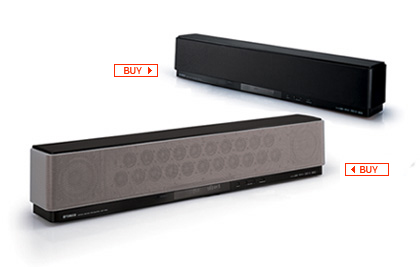 |
| Yamaha YSP-800 |
It accepts both analog stereo and digital audio inputs, either optical or coaxial. "Sound beams" are derived, some of which are bounced off the walls of the room to simulate surround sound.
The reviewer, Ken C. Pohlmann, says the result is quite close to 5.1 surround, except that no sound comes from in back of you — only from the sides. I can live with that.
Monday, June 05, 2006
Cinema Resolution
It's a legitimate question: how does the resolution of HDTV at 720p, 1080i, and 1080p compare with what we see in the cinema?
720p, for example, provides 720 rows of pixels, each row containing 1,280 pixels, in an image whose width-to-height ratio is 16:9. The horizontal resolution in "TV lines" (TVL) is 1,280 times 9/16, or 720 TVL. The number of TVL (720) is the same as the number of pixel rows because the pixels are square.
Meanwhile, experts agree that the best, most detailed film elements contain enough fine-detail information to make "2K," "4K," and even "6K" scans worthwhile, when film is being transferred to video by the latest and greatest in film scanning equipment. A 2K scan has 2,048 pixels per row, which at a 16:9 aspect ratio comes to 1,152 TVL. 4K doubles that to 4,096 pixels per row, or 2,304 TVL. And 6K scans yield fully 6,144 pixels per row, or 3,456 TVL.
So one might think that what we see at the local movieplex has resolution that good. But maybe not. According to a SIGGRAPH course called "The Technology of Digital Cinema," “Because of the statistical nature of frame unsteadiness and its attendant resolution loss, the vast majority of motion-picture viewers have been enjoying their
entertainment experience with a good deal less than 700 TVL ... .”
This is a quote from A. Kaiser, et. al., in ”Resolution Requirements for HDTV Based Upon the Performance of 35mm Motion-Picture Films for Theatrical Viewing,” SMPTE Journal, pp. 654-659, June 1985. It seems to be saying that film as projected has a lot less resolution than film per se does.
Not only does "frame unsteadiness" or "image unsteadiness" contribute to that resolution loss, so too do things like "MTF generational loss." MTF is short for "Modulation Transfer Function," the source of an unavoidable loss of detail that occurs any time an image is focused through a lens (see this excellent explanation for more about that topic).
When film is duplicated from its highly detailed original camera negative, going through interpositive and internegative generations en route to making a release print, there are multiple opportunities for MTF to blur the results. Then there's the MTF of the projection lens to consider, and, as noted, the "frame unsteadiness" or "image unsteadiness" that arises because (among other reasons) sprocket holes can be punched in the film with only so much precision.
So, if A. Kaiser is to be believed, the resolution that greets your eye on the screen at the local Bijou is generally less than that of 720p HDTV.
That in no way means that when the film comes out on HD DVD or Blu-ray high-def discs, it won't have all the resolution it nominally should (1,080 TVL). To the contrary, if it is a recent film, it will probably have been 2K- or 4K-scanned from the original negative, or at worst a first-generation interpositive, which provides all the resolution anyone could ask for. Some of that plethora of detail will in fact disappear in the downconversion to a 1080p/24 video master. Even so, with 1,080 TVL, the video master and the eventual hi-def DVD will out-detail anything you typically see at the movies.
720p, for example, provides 720 rows of pixels, each row containing 1,280 pixels, in an image whose width-to-height ratio is 16:9. The horizontal resolution in "TV lines" (TVL) is 1,280 times 9/16, or 720 TVL. The number of TVL (720) is the same as the number of pixel rows because the pixels are square.
Meanwhile, experts agree that the best, most detailed film elements contain enough fine-detail information to make "2K," "4K," and even "6K" scans worthwhile, when film is being transferred to video by the latest and greatest in film scanning equipment. A 2K scan has 2,048 pixels per row, which at a 16:9 aspect ratio comes to 1,152 TVL. 4K doubles that to 4,096 pixels per row, or 2,304 TVL. And 6K scans yield fully 6,144 pixels per row, or 3,456 TVL.
So one might think that what we see at the local movieplex has resolution that good. But maybe not. According to a SIGGRAPH course called "The Technology of Digital Cinema," “Because of the statistical nature of frame unsteadiness and its attendant resolution loss, the vast majority of motion-picture viewers have been enjoying their
entertainment experience with a good deal less than 700 TVL ... .”
This is a quote from A. Kaiser, et. al., in ”Resolution Requirements for HDTV Based Upon the Performance of 35mm Motion-Picture Films for Theatrical Viewing,” SMPTE Journal, pp. 654-659, June 1985. It seems to be saying that film as projected has a lot less resolution than film per se does.
Not only does "frame unsteadiness" or "image unsteadiness" contribute to that resolution loss, so too do things like "MTF generational loss." MTF is short for "Modulation Transfer Function," the source of an unavoidable loss of detail that occurs any time an image is focused through a lens (see this excellent explanation for more about that topic).
When film is duplicated from its highly detailed original camera negative, going through interpositive and internegative generations en route to making a release print, there are multiple opportunities for MTF to blur the results. Then there's the MTF of the projection lens to consider, and, as noted, the "frame unsteadiness" or "image unsteadiness" that arises because (among other reasons) sprocket holes can be punched in the film with only so much precision.
So, if A. Kaiser is to be believed, the resolution that greets your eye on the screen at the local Bijou is generally less than that of 720p HDTV.
That in no way means that when the film comes out on HD DVD or Blu-ray high-def discs, it won't have all the resolution it nominally should (1,080 TVL). To the contrary, if it is a recent film, it will probably have been 2K- or 4K-scanned from the original negative, or at worst a first-generation interpositive, which provides all the resolution anyone could ask for. Some of that plethora of detail will in fact disappear in the downconversion to a 1080p/24 video master. Even so, with 1,080 TVL, the video master and the eventual hi-def DVD will out-detail anything you typically see at the movies.
Wednesday, May 31, 2006
More Plasma Anomalies
As I said in an earlier post, my 32" Hitachi plasma can make black-and-white material look faintly greenish. That's not its only oddity, though. The amount of faux greenishness increases with decreasing settings of the color control (as I also reported). And reds tend to look orangish — not a true, satisfying red.
An article by HDTV expert Peter H. Putman, "The Plasma Doctor Is in the House," may explain this last anomaly. Putman says plasma panels, otherwise known in the trade simply as "glass," emit light when their constituent color phosphors are "tickled" by bursts of ultraviolet energy. The UV bursts come with an extra dollop of blue, UV's next-door neighbor in the color spectrum. To counteract the skew toward blue, plasma panels incorporate "capsulated color filters" that are designed in to restore a semblance of CRT-like hue.
"Other schemes have been tried to produce CRT-like phosphor response," Putman writes, "but the effects of UV color shift are still apparent with reds (they appear orange), greens (more of a lime green than a kelly or hunter green), and yellows (frequently shifting to a lemon, rather than an amber color)."
I'm not clear on whether the orangish reds come directly from the UV shift or from the wee color filters that are inserted in the light path to compensate for that shift. Whichever, it's clear that color on plasma TVs is a complex beast indeed. We're lucky it looks as much like CRT color as it does. (A CRT, for those not in the know, is a "cathode ray tube" — an old-fashioned picture tube, in other words.)
Putman also says that plasmas use "pulse-width modulation" to control how much light each phosphor emits: "a technique in which rapid on-off cycles can determine levels of luminance. The ratio of on cycles to off cycles within a given time interval translates into a specific luminance level."
(Here, "a given time interval" means a very tiny fraction of a second. Your eye can't actually see the on and off cycles, rest assured.)
Hence, says Putman, "on some panels, you may observe a color shift as brightness levels increase. The PWM method of simulating analog response works pretty well — my new GE electric range uses it to provide more control over the heating elements — but even PWM has its limits."
Translation: plasma display panels exhibit "non-linear response to changes in luminance levels. While a CRT is a purely linear display (small changes in driving voltage result in equivalent changes in anode current and brightness), a PDP is not." That's why it's apparently necessary for the user to lower the PDP's contrast setting below what the eye might ordinarily prefer. Otherwise, "you may observe a color shift as brightness levels increase."
I didn't mention it in my earlier article, but on my Hitachi plasma, the greenish tinge I see on B&W material seems to be more noticeable at high brightness levels than in relatively dark scenes.
None of this explains why my Hitachi's intrinsic grayscale calibration seems to vary with different settings of its color control — except to imply that with all the tweaking that is done in designing a plasma TV to get its hues even close to CRT-like, it's no surprise that there would be unsuspected interactions among the various user settings like contrast and color.
Another thing the Putman article reveals is that the process of calibrating a plasma's grayscale properly requires (a) a lot of hard-won expertise, compared with standard CRT calibrations, and (b) "a color analyzer with look-up tables for the specific phosphors used in each panel."
The specific-look-up-tables part seems to mean you can't use the generic look-up tables that normally come with a color analyzer, which is an instrument that objectively measures colored light sources.
"Chances are," writes Putman, "your panel came from one of these places: NEC, the Fujitsu-Hitachi plasma factory, Pioneer or Panasonic. (Although there aren't a lot of them out there yet, you will soon see panels coming from LG/Zenith and Samsung, and these will require their own phosphor look-up tables.) My FSR color analyzer is loaded with specific phosphor tables for each of the models listed (even the different phosphors in the Pioneer PDP-502 and PDP-503), thanks to Cliff Plavin of Progressive Labs, who took the individual measurements."
The expertise part comes in especially handy in performing the initial setup for the calibration process proper, in which you have to adjust the set's brightess and contrast controls to bypass the nonlinearities in light output spoken of earlier.
Both parts seem to suggest that, for us plasma TV owners, the idea of having our sets "professionally calibrated" — at no insignificant cost to us, I might add — may be fraught with danger. What if we happen to get a cocksure calibrator who's blissfully unaware of the pitfalls Putman has laid out? Or, what if the calibrator's ideas of proper brightness and contrast settings disagree with our own, such that when we readjust these variables after he leaves, his carefully metered grayscale goes totally kerflooey?
I'm not sure I'd even want a calibrator that doesn't have Cliff Plavin's home number in the directory on his cell phone, at any rate.
An article by HDTV expert Peter H. Putman, "The Plasma Doctor Is in the House," may explain this last anomaly. Putman says plasma panels, otherwise known in the trade simply as "glass," emit light when their constituent color phosphors are "tickled" by bursts of ultraviolet energy. The UV bursts come with an extra dollop of blue, UV's next-door neighbor in the color spectrum. To counteract the skew toward blue, plasma panels incorporate "capsulated color filters" that are designed in to restore a semblance of CRT-like hue.
"Other schemes have been tried to produce CRT-like phosphor response," Putman writes, "but the effects of UV color shift are still apparent with reds (they appear orange), greens (more of a lime green than a kelly or hunter green), and yellows (frequently shifting to a lemon, rather than an amber color)."
I'm not clear on whether the orangish reds come directly from the UV shift or from the wee color filters that are inserted in the light path to compensate for that shift. Whichever, it's clear that color on plasma TVs is a complex beast indeed. We're lucky it looks as much like CRT color as it does. (A CRT, for those not in the know, is a "cathode ray tube" — an old-fashioned picture tube, in other words.)
Putman also says that plasmas use "pulse-width modulation" to control how much light each phosphor emits: "a technique in which rapid on-off cycles can determine levels of luminance. The ratio of on cycles to off cycles within a given time interval translates into a specific luminance level."
(Here, "a given time interval" means a very tiny fraction of a second. Your eye can't actually see the on and off cycles, rest assured.)
Hence, says Putman, "on some panels, you may observe a color shift as brightness levels increase. The PWM method of simulating analog response works pretty well — my new GE electric range uses it to provide more control over the heating elements — but even PWM has its limits."
Translation: plasma display panels exhibit "non-linear response to changes in luminance levels. While a CRT is a purely linear display (small changes in driving voltage result in equivalent changes in anode current and brightness), a PDP is not." That's why it's apparently necessary for the user to lower the PDP's contrast setting below what the eye might ordinarily prefer. Otherwise, "you may observe a color shift as brightness levels increase."
I didn't mention it in my earlier article, but on my Hitachi plasma, the greenish tinge I see on B&W material seems to be more noticeable at high brightness levels than in relatively dark scenes.
None of this explains why my Hitachi's intrinsic grayscale calibration seems to vary with different settings of its color control — except to imply that with all the tweaking that is done in designing a plasma TV to get its hues even close to CRT-like, it's no surprise that there would be unsuspected interactions among the various user settings like contrast and color.
Another thing the Putman article reveals is that the process of calibrating a plasma's grayscale properly requires (a) a lot of hard-won expertise, compared with standard CRT calibrations, and (b) "a color analyzer with look-up tables for the specific phosphors used in each panel."
The specific-look-up-tables part seems to mean you can't use the generic look-up tables that normally come with a color analyzer, which is an instrument that objectively measures colored light sources.
"Chances are," writes Putman, "your panel came from one of these places: NEC, the Fujitsu-Hitachi plasma factory, Pioneer or Panasonic. (Although there aren't a lot of them out there yet, you will soon see panels coming from LG/Zenith and Samsung, and these will require their own phosphor look-up tables.) My FSR color analyzer is loaded with specific phosphor tables for each of the models listed (even the different phosphors in the Pioneer PDP-502 and PDP-503), thanks to Cliff Plavin of Progressive Labs, who took the individual measurements."
The expertise part comes in especially handy in performing the initial setup for the calibration process proper, in which you have to adjust the set's brightess and contrast controls to bypass the nonlinearities in light output spoken of earlier.
Both parts seem to suggest that, for us plasma TV owners, the idea of having our sets "professionally calibrated" — at no insignificant cost to us, I might add — may be fraught with danger. What if we happen to get a cocksure calibrator who's blissfully unaware of the pitfalls Putman has laid out? Or, what if the calibrator's ideas of proper brightness and contrast settings disagree with our own, such that when we readjust these variables after he leaves, his carefully metered grayscale goes totally kerflooey?
I'm not sure I'd even want a calibrator that doesn't have Cliff Plavin's home number in the directory on his cell phone, at any rate.
Sunday, May 28, 2006
1080p from High-Definition DVDs?
Now debuting: two, count 'em, two, mutually incompatible formats for high-definition DVDs: HD DVD and Blu-ray. These are the first two commercially available standards for video discs whose players (not the old-style DVD players we have now) will play the new discs into a suitable HDTV with all the resolution the TV can reproduce.
As long as, that is, the HDTV does not utilize the gold standard of high-definition television display: 1080p resolution. The initially available HD DVD players don't output 1080p. And it's not absolutely clear which, if any, of the Blu-ray players we're eagerly awaiting over the next few months are going to deliver 1080p.
In the last year or so, TVs whose "native" resolution is 1080p have sprung up, big as life, and taken a noticeable slice of the market. Their screens offer fully 1,080 rows of 1,920 pixels each, yielding the best spatial resolution available in consumer video history: roughly two million pixels overall on the screen.
1080i, the standard in use by many over-the-air HDTV broadcasters, has the same number of pixels as 1080p, but only half of them actually change with each screen update: first the odd-numbered rows, and then, a fraction of a second later, the even-numbered rows. This alternation of scan lines is "interlaced scanning," the origin of the "i" in 1080i.
In 1080p — "p" for "progresive scanning" — the entire pixel array gets updated, every time. Motion is smoother. Jaggies at the edges of moving objects, "twittering" scan lines, and now-you-see-it-now-you-don't tiny details — symptoms experts call "interlace artifacts" — are pretty much history.
So, do HD DVD and Blu-ray support 1080p?
The answer is, alas, complicated. In order to get 1080p to your eyeballs, you need at least four things:
Reportedly, most HD DVD and Blu-ray discs encode their main content, usually a movie, at 1080p, so no worry there.
Any TV which is advertised as 1080p-capable must have that as its native screen resolution, so this is not a huge problem (as long as you happen to own such a TV).
But most of the initial crop of "1080p" TVs cannot actually receive 1080p signals; 1080i is their maximum input capability. (That situation may have changed with the most recently introduced 1080p TVs, however.)
What's more, few if any of the initial HD DVD players actually output 1080p. (That may not be as true for Blu-ray; see below.) They convert the 1080p on the disc to 1080i, and ouptut that. The 1080p-native TV receives the signal as 1080i and deinterlaces it for display on the screen. The interlace-deinterlace sequence can introduce pesky artifacts.
Foolish, right, for HD DVD players not to support full-fledged 1080p output from the get-go? Well, part of the reason for the foolishness is that 1080p must travel between the player and the TV, if at all, along an HDMI cable. HDMI is a standard for the transmission of video data, audio, and other digital goodies between source devices such as DVD players and TVs. It uses HDCP copy protection to keep anyone from intercepting the digital stream and diverting it to their own (illegal) advantage — so it's very, very complicated.
But HDMI/HDCP's originally-strictly-optional ability to transmit and receive 1080p is just now actually appearing in consumer electronics gear for the first time. The initial HD DVD players are meanwhile sticking with an older, non-1080p implementation of HDMI.
For instance, one of the very first HD DVD players is the Toshiba HD-A1. According to Amazon.com, it can output either 720p or 1080i at its HDMI connection. No 1080p.
As for Blu-ray, it looks as if at least some of the initial player models will output 1080p on HDMI. For example, the yet-to-arrive (as of early June, 2006) Sony BDP-S1 will reportedly do so.
Another complicating factor: there are different flavors of 1080p, distinguished by their frame rates. How many frames of video per second are going to be transmitted? There are at least three popular answers: 24, 30, and 60.
24 fps (frames per second) matches the rate at which movies are shot. Hence, most HD DVD and Blu-ray discs are encoded at 1080p/24.
30 fps is typical of television broadcasts, both standard definition and high. If they're 1080i hi-def, as opposed to 720p, they are more precisely 1080i/60, not 1080i/30, since there are two interlaced "fields" per frame, one for the odd-numbered scan lines and one for the even. With interlaced transmission the number after the '/' is the field rate, not the frame rate ... and by the way, often the '/' is omitted: you'll see "1080p24," "1080i60," etc., instead of designations with slashes.
So the frame rate of 1080i/60 is actually 30 fps. 720p high-definition television (1,280 pixels across the screen by 720 vertically) doubles that frame rate to 60 fps: 720p/60. In 720p there are fewer pixels per frame than either 1080i or 1080p, but they're updated twice as often as 1080i/60. 720p is excellent for fast-action sports.
1080p/60, with 60 full frames every second, is another flavor of 1080p. Some current and/or soon-to-come "1080p" TVs apparently will accept 1080p/60 input, which can happen if the DVD player converts 1080p/24 to 1080p/60.
(Today, it's not easy to find out such precise frame-rate details about TVs and DVD players. Here's hoping that changes soon.)
What if the TV can only display 1080p at 30 fps or 60 fps, not at 24 fps, and what's on the disc is 1080p/24? Then either the player or the TV (typically the player) must perform a conversion. Again, as with any type of scan conversion, there is a potential for visible artifacts to result.
In this situation, the main reason for artifacting is that 60 is not an even multiple of 24. Neither is 30, for that matter. If 1080p/24 on DVD is converted to 1080p/60, or 1080p/30, or even 1080i/60, some frames in the output video will necessarily be interdigitated hybrids of two source frames, which can lead to ragged edges on moving objects. Or else the 24 input frames per second will be parceled out to varying numbers of output frames, some to one and others to two, making for jerky motion.
To avoid such motion artifacts, the TV ought to be able to operate at a 1080p frame rate that is an exact multiple of what's on the disc: say, 72 fps. 48 fps would work, too. And incidentally, the rate at which the TV "paints" frames on the screen is its "refresh rate," and is stated in Hertz or cycles per second. 48 frames per second is 48 Hz. 72 fps is 72 Hz.
A 24-Hz refresh rate with a one-to-one correspondence of output frames to incoming 1080p/24 frames would not work well, unfortunately. It would produce annoying flicker on any bright video display screen. (The reasoning is similar to why motion pictures are projected with each frame illuminated twice in 1/24 of a second.)
Ideally, the player would supply the TV with 1080p/24, and the TV could convert it to, say, 1080p/72 (or 1080p/48) to avoid the flicker common when bright video displays use a 24-fps refresh rate. The conversion from 24 to 72 frames per second is straightforward and does not produce visible artifacts.
Just the ability to learn such details about 1080p-native HDTVs and the initial crop of HD DVD and Blu-ray players ain't easy. And let's face it, the ideal hookup as I envision it will look only a smidgen better than converting 1080p/24 on the disc to 1080i/60 for HDMI transmission to the TV, assuming the TV could handle it, and then to (say) 1080p/30 for display on the TV screen at its native resolution. You'd have to be some kind of purist to even care, right?
Well ... as the incipient high-definition DVD format war heats up, we shall see whether people really do care, shall we not?
After all, all the early adopters who spend the big bucks now, at the dawn of hi-def DVD, may find later that waiting a few months, while all the pieces fall in place for an end-to-end 1080p DVD experience without unnecessary artifacts, would have given them a better picture for little if any extra cost.
They're sure to be miffed, right?
Don't say I didn't warn them.
As long as, that is, the HDTV does not utilize the gold standard of high-definition television display: 1080p resolution. The initially available HD DVD players don't output 1080p. And it's not absolutely clear which, if any, of the Blu-ray players we're eagerly awaiting over the next few months are going to deliver 1080p.
In the last year or so, TVs whose "native" resolution is 1080p have sprung up, big as life, and taken a noticeable slice of the market. Their screens offer fully 1,080 rows of 1,920 pixels each, yielding the best spatial resolution available in consumer video history: roughly two million pixels overall on the screen.
1080i, the standard in use by many over-the-air HDTV broadcasters, has the same number of pixels as 1080p, but only half of them actually change with each screen update: first the odd-numbered rows, and then, a fraction of a second later, the even-numbered rows. This alternation of scan lines is "interlaced scanning," the origin of the "i" in 1080i.
In 1080p — "p" for "progresive scanning" — the entire pixel array gets updated, every time. Motion is smoother. Jaggies at the edges of moving objects, "twittering" scan lines, and now-you-see-it-now-you-don't tiny details — symptoms experts call "interlace artifacts" — are pretty much history.
So, do HD DVD and Blu-ray support 1080p?
The answer is, alas, complicated. In order to get 1080p to your eyeballs, you need at least four things:
- a disc encoded at 1080p
- a DVD player that can output 1080p to the TV
- a TV that can receive 1080p from the player
- 1080p native resolution at the TV screen
Reportedly, most HD DVD and Blu-ray discs encode their main content, usually a movie, at 1080p, so no worry there.
Any TV which is advertised as 1080p-capable must have that as its native screen resolution, so this is not a huge problem (as long as you happen to own such a TV).
But most of the initial crop of "1080p" TVs cannot actually receive 1080p signals; 1080i is their maximum input capability. (That situation may have changed with the most recently introduced 1080p TVs, however.)
What's more, few if any of the initial HD DVD players actually output 1080p. (That may not be as true for Blu-ray; see below.) They convert the 1080p on the disc to 1080i, and ouptut that. The 1080p-native TV receives the signal as 1080i and deinterlaces it for display on the screen. The interlace-deinterlace sequence can introduce pesky artifacts.
Foolish, right, for HD DVD players not to support full-fledged 1080p output from the get-go? Well, part of the reason for the foolishness is that 1080p must travel between the player and the TV, if at all, along an HDMI cable. HDMI is a standard for the transmission of video data, audio, and other digital goodies between source devices such as DVD players and TVs. It uses HDCP copy protection to keep anyone from intercepting the digital stream and diverting it to their own (illegal) advantage — so it's very, very complicated.
But HDMI/HDCP's originally-strictly-optional ability to transmit and receive 1080p is just now actually appearing in consumer electronics gear for the first time. The initial HD DVD players are meanwhile sticking with an older, non-1080p implementation of HDMI.
For instance, one of the very first HD DVD players is the Toshiba HD-A1. According to Amazon.com, it can output either 720p or 1080i at its HDMI connection. No 1080p.
As for Blu-ray, it looks as if at least some of the initial player models will output 1080p on HDMI. For example, the yet-to-arrive (as of early June, 2006) Sony BDP-S1 will reportedly do so.
Another complicating factor: there are different flavors of 1080p, distinguished by their frame rates. How many frames of video per second are going to be transmitted? There are at least three popular answers: 24, 30, and 60.
24 fps (frames per second) matches the rate at which movies are shot. Hence, most HD DVD and Blu-ray discs are encoded at 1080p/24.
30 fps is typical of television broadcasts, both standard definition and high. If they're 1080i hi-def, as opposed to 720p, they are more precisely 1080i/60, not 1080i/30, since there are two interlaced "fields" per frame, one for the odd-numbered scan lines and one for the even. With interlaced transmission the number after the '/' is the field rate, not the frame rate ... and by the way, often the '/' is omitted: you'll see "1080p24," "1080i60," etc., instead of designations with slashes.
So the frame rate of 1080i/60 is actually 30 fps. 720p high-definition television (1,280 pixels across the screen by 720 vertically) doubles that frame rate to 60 fps: 720p/60. In 720p there are fewer pixels per frame than either 1080i or 1080p, but they're updated twice as often as 1080i/60. 720p is excellent for fast-action sports.
1080p/60, with 60 full frames every second, is another flavor of 1080p. Some current and/or soon-to-come "1080p" TVs apparently will accept 1080p/60 input, which can happen if the DVD player converts 1080p/24 to 1080p/60.
(Today, it's not easy to find out such precise frame-rate details about TVs and DVD players. Here's hoping that changes soon.)
What if the TV can only display 1080p at 30 fps or 60 fps, not at 24 fps, and what's on the disc is 1080p/24? Then either the player or the TV (typically the player) must perform a conversion. Again, as with any type of scan conversion, there is a potential for visible artifacts to result.
In this situation, the main reason for artifacting is that 60 is not an even multiple of 24. Neither is 30, for that matter. If 1080p/24 on DVD is converted to 1080p/60, or 1080p/30, or even 1080i/60, some frames in the output video will necessarily be interdigitated hybrids of two source frames, which can lead to ragged edges on moving objects. Or else the 24 input frames per second will be parceled out to varying numbers of output frames, some to one and others to two, making for jerky motion.
To avoid such motion artifacts, the TV ought to be able to operate at a 1080p frame rate that is an exact multiple of what's on the disc: say, 72 fps. 48 fps would work, too. And incidentally, the rate at which the TV "paints" frames on the screen is its "refresh rate," and is stated in Hertz or cycles per second. 48 frames per second is 48 Hz. 72 fps is 72 Hz.
A 24-Hz refresh rate with a one-to-one correspondence of output frames to incoming 1080p/24 frames would not work well, unfortunately. It would produce annoying flicker on any bright video display screen. (The reasoning is similar to why motion pictures are projected with each frame illuminated twice in 1/24 of a second.)
Ideally, the player would supply the TV with 1080p/24, and the TV could convert it to, say, 1080p/72 (or 1080p/48) to avoid the flicker common when bright video displays use a 24-fps refresh rate. The conversion from 24 to 72 frames per second is straightforward and does not produce visible artifacts.
Just the ability to learn such details about 1080p-native HDTVs and the initial crop of HD DVD and Blu-ray players ain't easy. And let's face it, the ideal hookup as I envision it will look only a smidgen better than converting 1080p/24 on the disc to 1080i/60 for HDMI transmission to the TV, assuming the TV could handle it, and then to (say) 1080p/30 for display on the TV screen at its native resolution. You'd have to be some kind of purist to even care, right?
Well ... as the incipient high-definition DVD format war heats up, we shall see whether people really do care, shall we not?
After all, all the early adopters who spend the big bucks now, at the dawn of hi-def DVD, may find later that waiting a few months, while all the pieces fall in place for an end-to-end 1080p DVD experience without unnecessary artifacts, would have given them a better picture for little if any extra cost.
They're sure to be miffed, right?
Don't say I didn't warn them.
Wednesday, April 19, 2006
Since When Is Black and White Green?
I think I've just figured out something that's been bugging me since I succumbed to temptation and bought a couple of HDTVs a couple of years ago. Especially on my Hitachi plasma in the basement, and less so on my Samsung DLP rear-projector in my living room, black and white programs can look distractingly greenish.
Such anomalies can often be laid at the doorstep of an inaccurate "grayscale"; indeed, that's the first reasonable explanation. Grayscale calibration means using test signals and expensive instruments to eliminate the inaccuracy by balancing the three primary colors — red, green, and blue — at every possible brightness level of the TV picture, so that the entire grayscale of the TV is pleasingly neutral in color.
Beware: grayscale calibration, if needed, is best done by a professional technician using state-of-the-art instruments.
For reasons I won't go into here, I had a bad experience trying to get professional grayscale calibration for my TVs. It never happened.
At any rate, recently I chanced to watch perhaps the first program I've ever seen on a high-definition channel in black and white: "Roy Orbison and Friends: A Black and White Night." (The show was recorded perhaps a year before the great singer-songwriter's untimely death from a heart attack in the late 1980s. The "friends" included a young Bruce Springsteen, Elvis Costello, Bonnie Raitt, k. d. lang, and a number of other music biz luminaries. Apparently it was taped in an early hi-def format. Great stuff technically, musically, and nostalgically.)
So this piece of hi-def, if B&W, gold showed up on my Samsung's screen with nary a trace of green!
That's chapter one. Chapter two: the same show was broadcast by my local PBS station during a pledge drive a few weeks ago. It was in standard definition this time. I watched it on my basement plasma, not my DLP, and it looked distressingly, disappointingly green.
Fortunately — and this is chapter three — it was even more recently shown yet again on INHD (or was it INHD2?) in hi-def, and when I watched that transmission on my plasma, no green tinge was apparent. The TV's grayscale appeared to be spot on, with no tint in sight.
Thus when a B&W show comes into my digital-cable DVR box over a standard-def channel, such as that of my local PBS affiliate, it can betray a green tincture. When the same show comes into that same DVR box over a hi-def channel such as INHD or INHD2, there can be no tincture. (In both cases my DVR box sends its output signal to my plasma TV over a digital HDMI/DVI connection, by the way, so the difference has nothing to do with the signal pathway.)
Oddly enough, I think I can explain this anomaly.
The explanation has to do with how TV signals are packaged. With the advent of color TV way back in the 1950s, there had to be tricks by which the three color primaries of red, green, and blue could be mixed to make a suitable black and white picture, if only for the benefit of the many existing non-color TV sets. The resulting signal was called "luminance," or Y. After it had certain other necessary processing steps applied to it, it was subsequently called "luma" or Y' ("Y-prime").
Luma or Y' is the sum of fixed proportions of the three chroma signals R', G', and B'. They in turn are derived from R, G, and B — shorthand for red, green, and blue.
The trouble today is, the fixed proportions of R', G', and B' that are used to compute Y' are different for HDTV than for standard-def TV.
Other things being equal, an HDTV set that expects any signal it receives to conform to the new HDTV luma-encoding standard will do strange things when the signal was actually encoded for SDTV-style luma.
In order to drive its tri-color screen, the HDTV will take apart the luma component — with the help of two "color difference" components it also sees, R' - Y' and B' - Y' — to get R', G', and B'. But if the luma was encoded with SDTV's version of the numerical coefficients, the HDTV will forward too much of the received luma component to the green sub-image of the overall picture, and too little to red and blue. Or so my reasoning goes.
That can turn Peter Lorre's frightened face in Casablanca a tad greenish. It can make Roy Orbison's famously tinted glasses on "Roy Orbison and Friends: A Black and White Night" really tinted.
(For techies, the difference in the two forms of luma encoding, one for SDTV and one for HDTV, can be researched by looking up "Rec. 601," a nickname for ITU-R Recommendation BT.601, the international standard for television studios' non-HDTV digital signals, and "Rec. 709," a nickname for ITU-R Recommendation BT.709, the international standard for television studios' HDTV digital signals. These two standards specify other things besides techniques for luma encoding, but luma encoding is one of the biggies. You can begin your research with this Wikipedia article. Note that the relevant SDTV standard is sometimes called by an earlier name, "CCIR 601.")
It is apparently easy, given equipment that can accomplish the task, to convert between the two luma encodings. That's how the same program could wind up with two different encodings, one on the high-definition channel and one on the standard-def channel. Engineers at the TV studio might apply the requisite conversion matrix — mathematics embodied in electronics — and voilà.
My plasma TV seems to be capable of reversing the process — but only when the signal reaches it in analog form via its component video or "YPbPr" input. In that case alone, the TV offers a user menu item which purports to let me switch between luma encodings manually.
Unfortunately, the same is not true of the digital connection I'm actually using between the cable DVR box and the TV. There, the signal comes out of the cable box's HDMI (High Definition Multimedia Interface) port, passing through an HDMI-to-DVI adapter into the realm of Digital Video Interface, or DVI, the digital video format that my two-year-old TV model is actually capable of receiving. DVI uses digital video signals exactly like those used for HDMI.
Such all-digital signal pathways into the TV simply assume the signal needs no conversion — or if it does, it takes place in the source device, in this case the cable box, prior to HDMI or DVI transmission. That's apparently why the TV, in its user menu, offers no color-encoding selection option for DVI.
Since filing the above I have done a little more experimenting with my Hitachi plasma TV. I now find that there undoubtedly exist more than one reason why black and white material can appear greenish.
I've recently purchased a four-DVD collection of the old British mystery movies starring Margaret Rutherford as Agatha Christie's amateur sleuth, Miss Marple. From the early 1960s, they're all in B&W. Played into the Hitachi via YPbPr (i.e., component video) from my Bose Lifestyle system's control unit, or via S-video from my Samsung DVD player, the first movie in the series, Murder She Said, exhibits an interesting anomaly. In the middle of one particular scene, at a transition to a new camera shot, the B&W picture changes from not greenish at all to just faintly greenish!
I'm not sure I can confirm this effect on my other HDTV, a Samsung DLP rear projector, using a different DVD player. It is, after all, quite a subtle effect. But it does show up big as life, in my iMac's DVD Player software, so I don't think I'm imagining it.
My best explanantion: I expect there is information recorded on the DVD which triggers a change in (I'm guessing) the so-called color space (Rec. 601 vs. Rec. 709) the DVD player is supposed to use when it decodes the DVD. The digital picture information on a DVD is, I'm aware, accompanied by a raft of on- or off-bits which tell how the video was recorded, how it should be played back, etc. Maybe during the authoring of this DVD a crucial flag was changed at the transition in question. Maybe some DVD players take the change into account and some don't.
As I said earlier, my Hitachi plasma's user menu allows me to change color spaces only for its YPbPr input, not for DVI or S-video input. In general I find that forcing its YPbPr color-space decoding method to that for Rec. 601, or SDTV, does indeed make a very slight difference in a B&W DVD being sent to the TV from the Bose player. It adds quite marginally to the greenishness ... but not enough to account for all the greenishness I see!
I also find that, strangely enough, adjusting the Hitachi user menu's color control affects the greenishness of a B&W picture! When the color setting is lowered, the greenishness of B&W increases. When the color setting is raised, the greenishness (almost) goes away. Furthermore — and this is really strange — this color-setting dependency applies to YPbPr when the Pb and Pr input cables are both disconnected(!), such that the only input the TV receives is the supposedly colorless Y, or luma, signal.
Which suggests that the TV's internal color decoding algorithms do some odd things. You would think — obviously erroneously — that the luma signal would be treated the same, no matter what setting the color control has, since color (chroma; Pb and Pr) and black-and-white (luma; Y') are nominally independent. So if the B&W picture were on the greenish side with one color setting, it would be equally on the greenish side with another. But no! There's a clear-cut difference in the greenishness at different color settings.
That suggests that maybe I've been too hasty in dismissing the possibility (see above) that I ought to have my Hitachi professionally calibrated.
Yet, if my Hitachi is capable of, in effect, changing its calibration settings when the user color setting is altered, I wonder how much good professional calibration would do. I envision the calibrator being totally stumped by the TV's complexity — "They sure didn't tell me it could do that in calibrating school" — and telling me that compromises must inevitably be made. Live with it.
By the way, I think I can conclude from the foregoing that the Murder She Said DVD, at least prior to the camera-shot transition mentioned above, causes signal information to be put out on the Pb and Pr (i.e., chroma) channels such that the Y or luma signal is modified to offset what would otherwise be a greenish tinge. After the transition, perhaps the compensating Pb/Pr signals disappear, and there is greenishness. As I say, this change happens also in my computer software DVD player.
So there may be several possible sources of greenishness in a B&W picture:
If that's so, I can only conclude that TV in the digital age is so complex that it's almost impossible to get a "perfect" picture, if by "perfect" you mean a B&W rendition that is totally free of tint.
Such anomalies can often be laid at the doorstep of an inaccurate "grayscale"; indeed, that's the first reasonable explanation. Grayscale calibration means using test signals and expensive instruments to eliminate the inaccuracy by balancing the three primary colors — red, green, and blue — at every possible brightness level of the TV picture, so that the entire grayscale of the TV is pleasingly neutral in color.
Beware: grayscale calibration, if needed, is best done by a professional technician using state-of-the-art instruments.
For reasons I won't go into here, I had a bad experience trying to get professional grayscale calibration for my TVs. It never happened.
At any rate, recently I chanced to watch perhaps the first program I've ever seen on a high-definition channel in black and white: "Roy Orbison and Friends: A Black and White Night." (The show was recorded perhaps a year before the great singer-songwriter's untimely death from a heart attack in the late 1980s. The "friends" included a young Bruce Springsteen, Elvis Costello, Bonnie Raitt, k. d. lang, and a number of other music biz luminaries. Apparently it was taped in an early hi-def format. Great stuff technically, musically, and nostalgically.)
So this piece of hi-def, if B&W, gold showed up on my Samsung's screen with nary a trace of green!
That's chapter one. Chapter two: the same show was broadcast by my local PBS station during a pledge drive a few weeks ago. It was in standard definition this time. I watched it on my basement plasma, not my DLP, and it looked distressingly, disappointingly green.
Fortunately — and this is chapter three — it was even more recently shown yet again on INHD (or was it INHD2?) in hi-def, and when I watched that transmission on my plasma, no green tinge was apparent. The TV's grayscale appeared to be spot on, with no tint in sight.
Thus when a B&W show comes into my digital-cable DVR box over a standard-def channel, such as that of my local PBS affiliate, it can betray a green tincture. When the same show comes into that same DVR box over a hi-def channel such as INHD or INHD2, there can be no tincture. (In both cases my DVR box sends its output signal to my plasma TV over a digital HDMI/DVI connection, by the way, so the difference has nothing to do with the signal pathway.)
Oddly enough, I think I can explain this anomaly.
The explanation has to do with how TV signals are packaged. With the advent of color TV way back in the 1950s, there had to be tricks by which the three color primaries of red, green, and blue could be mixed to make a suitable black and white picture, if only for the benefit of the many existing non-color TV sets. The resulting signal was called "luminance," or Y. After it had certain other necessary processing steps applied to it, it was subsequently called "luma" or Y' ("Y-prime").
Luma or Y' is the sum of fixed proportions of the three chroma signals R', G', and B'. They in turn are derived from R, G, and B — shorthand for red, green, and blue.
The trouble today is, the fixed proportions of R', G', and B' that are used to compute Y' are different for HDTV than for standard-def TV.
Other things being equal, an HDTV set that expects any signal it receives to conform to the new HDTV luma-encoding standard will do strange things when the signal was actually encoded for SDTV-style luma.
In order to drive its tri-color screen, the HDTV will take apart the luma component — with the help of two "color difference" components it also sees, R' - Y' and B' - Y' — to get R', G', and B'. But if the luma was encoded with SDTV's version of the numerical coefficients, the HDTV will forward too much of the received luma component to the green sub-image of the overall picture, and too little to red and blue. Or so my reasoning goes.
That can turn Peter Lorre's frightened face in Casablanca a tad greenish. It can make Roy Orbison's famously tinted glasses on "Roy Orbison and Friends: A Black and White Night" really tinted.
(For techies, the difference in the two forms of luma encoding, one for SDTV and one for HDTV, can be researched by looking up "Rec. 601," a nickname for ITU-R Recommendation BT.601, the international standard for television studios' non-HDTV digital signals, and "Rec. 709," a nickname for ITU-R Recommendation BT.709, the international standard for television studios' HDTV digital signals. These two standards specify other things besides techniques for luma encoding, but luma encoding is one of the biggies. You can begin your research with this Wikipedia article. Note that the relevant SDTV standard is sometimes called by an earlier name, "CCIR 601.")
It is apparently easy, given equipment that can accomplish the task, to convert between the two luma encodings. That's how the same program could wind up with two different encodings, one on the high-definition channel and one on the standard-def channel. Engineers at the TV studio might apply the requisite conversion matrix — mathematics embodied in electronics — and voilà.
My plasma TV seems to be capable of reversing the process — but only when the signal reaches it in analog form via its component video or "YPbPr" input. In that case alone, the TV offers a user menu item which purports to let me switch between luma encodings manually.
Unfortunately, the same is not true of the digital connection I'm actually using between the cable DVR box and the TV. There, the signal comes out of the cable box's HDMI (High Definition Multimedia Interface) port, passing through an HDMI-to-DVI adapter into the realm of Digital Video Interface, or DVI, the digital video format that my two-year-old TV model is actually capable of receiving. DVI uses digital video signals exactly like those used for HDMI.
Such all-digital signal pathways into the TV simply assume the signal needs no conversion — or if it does, it takes place in the source device, in this case the cable box, prior to HDMI or DVI transmission. That's apparently why the TV, in its user menu, offers no color-encoding selection option for DVI.
* * *
Since filing the above I have done a little more experimenting with my Hitachi plasma TV. I now find that there undoubtedly exist more than one reason why black and white material can appear greenish.
I've recently purchased a four-DVD collection of the old British mystery movies starring Margaret Rutherford as Agatha Christie's amateur sleuth, Miss Marple. From the early 1960s, they're all in B&W. Played into the Hitachi via YPbPr (i.e., component video) from my Bose Lifestyle system's control unit, or via S-video from my Samsung DVD player, the first movie in the series, Murder She Said, exhibits an interesting anomaly. In the middle of one particular scene, at a transition to a new camera shot, the B&W picture changes from not greenish at all to just faintly greenish!
I'm not sure I can confirm this effect on my other HDTV, a Samsung DLP rear projector, using a different DVD player. It is, after all, quite a subtle effect. But it does show up big as life, in my iMac's DVD Player software, so I don't think I'm imagining it.
My best explanantion: I expect there is information recorded on the DVD which triggers a change in (I'm guessing) the so-called color space (Rec. 601 vs. Rec. 709) the DVD player is supposed to use when it decodes the DVD. The digital picture information on a DVD is, I'm aware, accompanied by a raft of on- or off-bits which tell how the video was recorded, how it should be played back, etc. Maybe during the authoring of this DVD a crucial flag was changed at the transition in question. Maybe some DVD players take the change into account and some don't.
As I said earlier, my Hitachi plasma's user menu allows me to change color spaces only for its YPbPr input, not for DVI or S-video input. In general I find that forcing its YPbPr color-space decoding method to that for Rec. 601, or SDTV, does indeed make a very slight difference in a B&W DVD being sent to the TV from the Bose player. It adds quite marginally to the greenishness ... but not enough to account for all the greenishness I see!
I also find that, strangely enough, adjusting the Hitachi user menu's color control affects the greenishness of a B&W picture! When the color setting is lowered, the greenishness of B&W increases. When the color setting is raised, the greenishness (almost) goes away. Furthermore — and this is really strange — this color-setting dependency applies to YPbPr when the Pb and Pr input cables are both disconnected(!), such that the only input the TV receives is the supposedly colorless Y, or luma, signal.
Which suggests that the TV's internal color decoding algorithms do some odd things. You would think — obviously erroneously — that the luma signal would be treated the same, no matter what setting the color control has, since color (chroma; Pb and Pr) and black-and-white (luma; Y') are nominally independent. So if the B&W picture were on the greenish side with one color setting, it would be equally on the greenish side with another. But no! There's a clear-cut difference in the greenishness at different color settings.
That suggests that maybe I've been too hasty in dismissing the possibility (see above) that I ought to have my Hitachi professionally calibrated.
Yet, if my Hitachi is capable of, in effect, changing its calibration settings when the user color setting is altered, I wonder how much good professional calibration would do. I envision the calibrator being totally stumped by the TV's complexity — "They sure didn't tell me it could do that in calibrating school" — and telling me that compromises must inevitably be made. Live with it.
By the way, I think I can conclude from the foregoing that the Murder She Said DVD, at least prior to the camera-shot transition mentioned above, causes signal information to be put out on the Pb and Pr (i.e., chroma) channels such that the Y or luma signal is modified to offset what would otherwise be a greenish tinge. After the transition, perhaps the compensating Pb/Pr signals disappear, and there is greenishness. As I say, this change happens also in my computer software DVD player.
So there may be several possible sources of greenishness in a B&W picture:
- the DVD player or other source device using the wrong color-space decoding parameters, i.e., Rec. 601 rather than Rec. 709
- inaccurate TV grayscale calibration
- other oddities in the TV's color-decoding methodolgy
- oddities in how the DVD was authored or the source program was broadcast
- and perhaps many others
If that's so, I can only conclude that TV in the digital age is so complex that it's almost impossible to get a "perfect" picture, if by "perfect" you mean a B&W rendition that is totally free of tint.
Monday, February 06, 2006
Super Bowl XL
I've been neglecting this blog. What better way to get back into it than to cheer yesterday's high-def Super Bowl XL telecast by ABC.
The play on the field was suspenseful, if not artful. The team I was rooting for, the Steelers, won.
The announcing by the team of Michaels and Madden was competent and professional.
The picture and sound were excellent in 720p on my 720p-native Samsung DLP.
The commercials were entertaining, a few even memorable. (My problem is that I'll remember the ad but not necessarily the sponsor. Which airline was it that showed a just-fired-by-phone employee taking a last-minute flight to the city where his mealy-mouthed boss was addressing a business convention, so that he might — heh, heh — tackle his ass right off the podium?)
And the Rolling Stones, however aged, were gratifying to see at halftime, to this geezer who was at an early concert of theirs when "I Can't Get No Satisfaction" was a hit. As Mick Jagger said, it could have been performed at Super Bowl I. Also gratifying was that "Start Me Up" and "Rough Justice," the other two songs they performed, were bleeped. Shows you that some things never change ... the Stones had to self-censor "Let's Spend the Night Together" in order to be permitted to do it on Ed Sullivan, back in the day.
I was actually sick in bed, or almost in bed, and I didn't go out or have buddies over. So I appreciated having Comcast's HD DVR cable box to record the game to. I went to bed for real just after Mick and Co. were done, got up in the night to watch the third quarter, went back to bed, and then watched Quarter Number 4 in the A.M. before breakfast.
It's a good feature the DVR box lets you start a recording from a live broadcast already in progress and then lets you edit the recording options on the fly so that you record beyond the ostensible end of the game, which was set for 9:45 in the DVR's onboard program guide. I set the DVR to record an extra hour, until 10:45, and I was glad I did because the game didn't end until after 10:00, if I have that time right.
The play on the field was suspenseful, if not artful. The team I was rooting for, the Steelers, won.
The announcing by the team of Michaels and Madden was competent and professional.
The picture and sound were excellent in 720p on my 720p-native Samsung DLP.
The commercials were entertaining, a few even memorable. (My problem is that I'll remember the ad but not necessarily the sponsor. Which airline was it that showed a just-fired-by-phone employee taking a last-minute flight to the city where his mealy-mouthed boss was addressing a business convention, so that he might — heh, heh — tackle his ass right off the podium?)
And the Rolling Stones, however aged, were gratifying to see at halftime, to this geezer who was at an early concert of theirs when "I Can't Get No Satisfaction" was a hit. As Mick Jagger said, it could have been performed at Super Bowl I. Also gratifying was that "Start Me Up" and "Rough Justice," the other two songs they performed, were bleeped. Shows you that some things never change ... the Stones had to self-censor "Let's Spend the Night Together" in order to be permitted to do it on Ed Sullivan, back in the day.
I was actually sick in bed, or almost in bed, and I didn't go out or have buddies over. So I appreciated having Comcast's HD DVR cable box to record the game to. I went to bed for real just after Mick and Co. were done, got up in the night to watch the third quarter, went back to bed, and then watched Quarter Number 4 in the A.M. before breakfast.
It's a good feature the DVR box lets you start a recording from a live broadcast already in progress and then lets you edit the recording options on the fly so that you record beyond the ostensible end of the game, which was set for 9:45 in the DVR's onboard program guide. I set the DVR to record an extra hour, until 10:45, and I was glad I did because the game didn't end until after 10:00, if I have that time right.
Wednesday, November 02, 2005
More on 1080p TVs
In Sony's Groundbreaking New SXRD RPTVs I said some good things about two new HDTVs from Sony, both offering full 1080p screen resolution (but neither, unfortunately, allowing actual 1080p input). Both use Sony's version of Liquid Crystal on Silicon technology, which Sony calls SXRD.
I saw the 60" version today at Best Buy, and also a larger Toshiba DLP that likewise is 1080p-native (for more on what that means, see Eyes on the 1080p Prize). Both produced a picture that was noticeably better than the HDTVs with lesser resolution nearby. There were also some excellent Samsung 1080p DLPs (such as this one) on display.
 Then I looked at the cream of the current crop: a Mitsubishi 1080p DLP-based rear projector, the WD-73927 pictured here. It was a huge 73-inch slice of video heaven, for a price in the six-grand range.
Unlike some of the others, it was in a dimly lit room where the most desirable TVs are on display at Best Buy. Unlike with most of the other models, in fron to this one there was a place to sit and ogle. And thanks to the good folks at Mitsubishi, this TV was connected to a hard-drive-based HDTV recorder feeding it an actual 1080p input signal!
The visual result was as much better than the other 1080p models, limited as they were to (presumably, vertically filtered) 1080i inputs, as the others outstripped the lesser, non-1080i/p HDTVs.
All 0f which confirms my suspicion that TVs that do 1080p input and display will one day be the way to go.
(BTW, I was told by a sales person at Best Buy that Samsung and several other manufacturers now offer 1080p flat panels that use LCD technology. Not LCoS, but LCD. It would seem that every non-CRT HDTV technology but plasma has jumped on the 1080p bandwagon. Can plasma be far behind?)
I saw the 60" version today at Best Buy, and also a larger Toshiba DLP that likewise is 1080p-native (for more on what that means, see Eyes on the 1080p Prize). Both produced a picture that was noticeably better than the HDTVs with lesser resolution nearby. There were also some excellent Samsung 1080p DLPs (such as this one) on display.
Then I looked at the cream of the current crop: a Mitsubishi 1080p DLP-based rear projector, the WD-73927 pictured here. It was a huge 73-inch slice of video heaven, for a price in the six-grand range.Unlike some of the others, it was in a dimly lit room where the most desirable TVs are on display at Best Buy. Unlike with most of the other models, in fron to this one there was a place to sit and ogle. And thanks to the good folks at Mitsubishi, this TV was connected to a hard-drive-based HDTV recorder feeding it an actual 1080p input signal!
The visual result was as much better than the other 1080p models, limited as they were to (presumably, vertically filtered) 1080i inputs, as the others outstripped the lesser, non-1080i/p HDTVs.
All 0f which confirms my suspicion that TVs that do 1080p input and display will one day be the way to go.
(BTW, I was told by a sales person at Best Buy that Samsung and several other manufacturers now offer 1080p flat panels that use LCD technology. Not LCoS, but LCD. It would seem that every non-CRT HDTV technology but plasma has jumped on the 1080p bandwagon. Can plasma be far behind?)
Monday, October 31, 2005
Eyes on the 1080p Prize
In the best of all possible HDTV worlds, 1080p would be a firm reality.
We would, that is, have TVs to which true 1080p source material could be input and displayed as such: video frames having 1,080 rows of pixels, each horizontal row containing 16:9 x 1,080 = 1,920 pixels.
A video frame? It's what you see when you hit pause on a DVD player, a single frozen image, with no movement. Moving video is really a succession of such frames, displayed one after another so fast that your eye perceives motion.
For 1080p reception, each 1,920 x 1,080 input frame of video would be received and presented fully intact, which is what the "p" (for "progressive scan") means. As transmitted, it would not be subdivided into two "i"-for-"interlaced" fields, with only the odd-numbered pixel rows present in field #1 and only the even-numbered rows, 1/60 second later, in field #2.
A pixel row is also called a "scan line." When the latter type of 1080-line scanning is done, with each video field containing only alternate scan lines, not the whole image "raster" at once, the transmission method is 1080i, not 1080p. 1080i scanning typically produces 60 fields per second, which comes to 30 frames per second.
Over-the-air high-definition television broadcasts use either 1080i or 720p: 720 rows of pixels, 16:9 x 720 = 1,280 pixels per row, progressive scan, 30 non-subdivided frames per second. 1080p is not supported over the air; it doubles the number of pixels transmitted per second by 1080i, requiring TV channels to hog unacceptably high bandwidth.
Unless ... a more efficient digital video compression scheme is used. At the time the standards for HDTV broadcasting were set, MPEG-2 was the best compression method around. Now we have MPEG-4, which squeezes digital video down far more compactly. We also have VC-1, based on Windows Media Video (version 9). Both are supported by the two emerging competitors for high-definition blue-laser DVDs: Blu-ray and HD DVD. Blu-ray and HD DVD could offer us true 1080p discs without paying a huge price in data rate or storage capacity.
The blue-laser DVD gurus, however, have as yet committed to no more than 1080i. For one thing, there are few if any TVs that can input 1080p — even though a number of new models can display it. (See, for example, Sony's Groundbreaking New SXRD RPTVs.) There seems to be no agreement on how to copy-protect 1080p, for another thing.
There are yet subtler problems. For example, true 1080p promises greater visual detail than merely "deinterlacing" 1080i would imply. But how to get there?
Most newfangled TVs need to deinterlace 1080i to some progressively scanned form — unless they are based on old-fashioned cathode-ray tube technology with actual scan lines traced out by an electron beam, that is. One conceptually simple form of deinterlacing is to "borrow" the pixel rows that are not present in a given field from the other field in the same frame. Another is to interpolate the pixels between those which are actually present: to "guess" what they would contain, if they were really there.
There are more sophisticated approaches. One of them is to notice that the video program originated in film, and use so-called 3:2 pulldown compensation. The TV figures out which other fields of which other frames really came from the same film frame — owing to the fact that film unwinds at a mere 24 frames per second, not 30 — so it knows how to fill in the missing pixel rows in a given field with total precision.
Unless deinterlacing can leverage such special knowledge as that, the interpolated or borrowed or calculated pixels constitute "false" information. What's worse, they don't really count as "new" information at all, for they don't contain any extra detail. For that reason alone, true 1080p can improve on the "false" detail present in deinterlaced 1080i quite considerably.
But there's another reason as well, yet more subtle, why we ought to prefer 1080p. In interlaced scanning, vertical resolution — the number of horizontal lines actually visible in the image — is reduced to avoid interline flicker.
So if there are 1,080 rows of pixels, there may be only 70% of that number of visibly distinguishable lines of image content: say, 756 lines of vertical resolution.
"When adjacent lines in the frame (which are transmitted and displayed one field-time apart) are not identical," says this web page, interlaced scanning will produce a flickering effect. If the field-time is 1/60 second, you can get a tiny detail (say, white) in the first 1/60 second that disappears (turns black) in the second 1/60 second. Enough of those details coming and going, and the display as a whole will have an annoying 30-Hz flicker.
That's bad, so the camera simply filters out the smallest details present in the vertical dimension of the image. 1,080 rows of pixels then produce only, say, 756 lines of vertical resolution.
But if you know the image is going to be captured, recorded, transmitted, received, and displayed at 1080p, you don't have to filter to avoid interline flicker.
Another thing 1080p offers is a way to avoid the 3:2-pulldown problem entirely.
When film at 24 frames per second is transferred to video at 30 frames per second, the film is "pulled down" — advanced — in a herky-jerky way such that some film frames contribute their visual information to three video fields, while other film frames contribute to only two video fields. That's 3:2 pulldown, also called 2:3 pulldown.
If such film-transferred video is not deinterlaced with totally accurate 3:2-pulldown compensation — TV user menus often call it "film mode" — then those video frames whose two fields come from two different film frames can produce "jaggies," or worse, on the screen. Fie!
1080p can avoid that problem entirely by recording video at the same frame rate as film uses: 24 fps. That way, there's a 1:1 correspondence between film frames and video frames. (To avoid the flicker sometimes associated with such a low frame rate, the TV can display each video frame three times in each 1/24 second frame time, for an effective 72 frames per second.)
In the real world, we don't even know as of now whether there will ever be any true 1080p DVDs, much less whether they will be made with all the vertical resolution 1080p "ought to have." They might be filtered in deference to CRT-based interlaced HDTV displays.
But we can always hope true 1080p DVDs are on the way, with no vertical filtering!
We would, that is, have TVs to which true 1080p source material could be input and displayed as such: video frames having 1,080 rows of pixels, each horizontal row containing 16:9 x 1,080 = 1,920 pixels.
A video frame? It's what you see when you hit pause on a DVD player, a single frozen image, with no movement. Moving video is really a succession of such frames, displayed one after another so fast that your eye perceives motion.
For 1080p reception, each 1,920 x 1,080 input frame of video would be received and presented fully intact, which is what the "p" (for "progressive scan") means. As transmitted, it would not be subdivided into two "i"-for-"interlaced" fields, with only the odd-numbered pixel rows present in field #1 and only the even-numbered rows, 1/60 second later, in field #2.
A pixel row is also called a "scan line." When the latter type of 1080-line scanning is done, with each video field containing only alternate scan lines, not the whole image "raster" at once, the transmission method is 1080i, not 1080p. 1080i scanning typically produces 60 fields per second, which comes to 30 frames per second.
Over-the-air high-definition television broadcasts use either 1080i or 720p: 720 rows of pixels, 16:9 x 720 = 1,280 pixels per row, progressive scan, 30 non-subdivided frames per second. 1080p is not supported over the air; it doubles the number of pixels transmitted per second by 1080i, requiring TV channels to hog unacceptably high bandwidth.
Unless ... a more efficient digital video compression scheme is used. At the time the standards for HDTV broadcasting were set, MPEG-2 was the best compression method around. Now we have MPEG-4, which squeezes digital video down far more compactly. We also have VC-1, based on Windows Media Video (version 9). Both are supported by the two emerging competitors for high-definition blue-laser DVDs: Blu-ray and HD DVD. Blu-ray and HD DVD could offer us true 1080p discs without paying a huge price in data rate or storage capacity.
The blue-laser DVD gurus, however, have as yet committed to no more than 1080i. For one thing, there are few if any TVs that can input 1080p — even though a number of new models can display it. (See, for example, Sony's Groundbreaking New SXRD RPTVs.) There seems to be no agreement on how to copy-protect 1080p, for another thing.
There are yet subtler problems. For example, true 1080p promises greater visual detail than merely "deinterlacing" 1080i would imply. But how to get there?
Most newfangled TVs need to deinterlace 1080i to some progressively scanned form — unless they are based on old-fashioned cathode-ray tube technology with actual scan lines traced out by an electron beam, that is. One conceptually simple form of deinterlacing is to "borrow" the pixel rows that are not present in a given field from the other field in the same frame. Another is to interpolate the pixels between those which are actually present: to "guess" what they would contain, if they were really there.
There are more sophisticated approaches. One of them is to notice that the video program originated in film, and use so-called 3:2 pulldown compensation. The TV figures out which other fields of which other frames really came from the same film frame — owing to the fact that film unwinds at a mere 24 frames per second, not 30 — so it knows how to fill in the missing pixel rows in a given field with total precision.
Unless deinterlacing can leverage such special knowledge as that, the interpolated or borrowed or calculated pixels constitute "false" information. What's worse, they don't really count as "new" information at all, for they don't contain any extra detail. For that reason alone, true 1080p can improve on the "false" detail present in deinterlaced 1080i quite considerably.
But there's another reason as well, yet more subtle, why we ought to prefer 1080p. In interlaced scanning, vertical resolution — the number of horizontal lines actually visible in the image — is reduced to avoid interline flicker.
So if there are 1,080 rows of pixels, there may be only 70% of that number of visibly distinguishable lines of image content: say, 756 lines of vertical resolution.
"When adjacent lines in the frame (which are transmitted and displayed one field-time apart) are not identical," says this web page, interlaced scanning will produce a flickering effect. If the field-time is 1/60 second, you can get a tiny detail (say, white) in the first 1/60 second that disappears (turns black) in the second 1/60 second. Enough of those details coming and going, and the display as a whole will have an annoying 30-Hz flicker.
That's bad, so the camera simply filters out the smallest details present in the vertical dimension of the image. 1,080 rows of pixels then produce only, say, 756 lines of vertical resolution.
But if you know the image is going to be captured, recorded, transmitted, received, and displayed at 1080p, you don't have to filter to avoid interline flicker.
Another thing 1080p offers is a way to avoid the 3:2-pulldown problem entirely.
When film at 24 frames per second is transferred to video at 30 frames per second, the film is "pulled down" — advanced — in a herky-jerky way such that some film frames contribute their visual information to three video fields, while other film frames contribute to only two video fields. That's 3:2 pulldown, also called 2:3 pulldown.
If such film-transferred video is not deinterlaced with totally accurate 3:2-pulldown compensation — TV user menus often call it "film mode" — then those video frames whose two fields come from two different film frames can produce "jaggies," or worse, on the screen. Fie!
1080p can avoid that problem entirely by recording video at the same frame rate as film uses: 24 fps. That way, there's a 1:1 correspondence between film frames and video frames. (To avoid the flicker sometimes associated with such a low frame rate, the TV can display each video frame three times in each 1/24 second frame time, for an effective 72 frames per second.)
In the real world, we don't even know as of now whether there will ever be any true 1080p DVDs, much less whether they will be made with all the vertical resolution 1080p "ought to have." They might be filtered in deference to CRT-based interlaced HDTV displays.
But we can always hope true 1080p DVDs are on the way, with no vertical filtering!
Monday, October 24, 2005
Waiting to Buy an HDTV? Smart Move!
Are you biding you time before investing in an HDTV? If so, you may be smart. As I mentioned in Sony's Groundbreaking New SXRD RPTVs, HDTV makers are improving the breed at a rapid clip just now. Not only has Sony just introduced a pair of attractive new rear projectors employing the version of Liquid Crystal on Silicon (LCoS) technology Sony calls SXRD, for Silicon X-tal Reflective Display, but JVC is also just entering the LCoS race with a vengeance.
Its 70FH96 rear projector is just about to hit the stores, says the Nov. 2005 Sound & Vision magazine (p. 26). This 70" 1080p behemoth, which sells for $6,000, is also an LCoS implementation, though JVC calls it D-ILA, for Direct-drive Image Light Amplifier. When it's high-def — and 1080p is the highest of high-def — JVC dubs it HD-ILA.
The same magazine also contains a blurb (p. 28) about Pioneer's latest plasma flat panels, among them the 43" PDP-4360HD for $4,500. These plasmas "boast better contrast than ever before," says S&V, mediocre contrast being one of the principal banes of plasma up to now, due to grayish black levels. The PDP-4360HD also has "multiple HDMI connectors" — so you can use more than one digital signal source without falling back on analog connections — "in a separate media box" — so you can make all external connections not to the flat panel itself, mounted on a wall, but to a separate box that connects to the flat panel by a small handful of two or three wires.
And if you realize you'll be needing a TV with a digital tuner one fine day but don't give a hoot about high definition, check out the blurb on page 20 about RCA's new digital standard-definition TVs. The 27" 27F634T, listing for $359, is shown. It has the "old-fashioned" squarish screen that we're so accustomed to and downconverts signals (including HD signals) to good old 480i, the "standard resolution for all analog signals." Translation: you can now spend what you've long been expecting to spend for a new TV — three figures — and get one that looks just like TVs of yore, in terms of picture shape and quality. But it's future-proof. It receives off-the-air digital broadcasts, so when analog transmissions bite the dust in the next year or four, you'll be ready even if you don't subscribe to cable or satellite TV.
Its 70FH96 rear projector is just about to hit the stores, says the Nov. 2005 Sound & Vision magazine (p. 26). This 70" 1080p behemoth, which sells for $6,000, is also an LCoS implementation, though JVC calls it D-ILA, for Direct-drive Image Light Amplifier. When it's high-def — and 1080p is the highest of high-def — JVC dubs it HD-ILA.
The same magazine also contains a blurb (p. 28) about Pioneer's latest plasma flat panels, among them the 43" PDP-4360HD for $4,500. These plasmas "boast better contrast than ever before," says S&V, mediocre contrast being one of the principal banes of plasma up to now, due to grayish black levels. The PDP-4360HD also has "multiple HDMI connectors" — so you can use more than one digital signal source without falling back on analog connections — "in a separate media box" — so you can make all external connections not to the flat panel itself, mounted on a wall, but to a separate box that connects to the flat panel by a small handful of two or three wires.
And if you realize you'll be needing a TV with a digital tuner one fine day but don't give a hoot about high definition, check out the blurb on page 20 about RCA's new digital standard-definition TVs. The 27" 27F634T, listing for $359, is shown. It has the "old-fashioned" squarish screen that we're so accustomed to and downconverts signals (including HD signals) to good old 480i, the "standard resolution for all analog signals." Translation: you can now spend what you've long been expecting to spend for a new TV — three figures — and get one that looks just like TVs of yore, in terms of picture shape and quality. But it's future-proof. It receives off-the-air digital broadcasts, so when analog transmissions bite the dust in the next year or four, you'll be ready even if you don't subscribe to cable or satellite TV.
Sunday, October 23, 2005
Looking Forward to High-Def DVD?
One of the hot topics these days in HDTV land is the imminent arrival of high-definition DVDs. There's a format war a-brewin', with two mutually incompatible versions on tap: Blu-ray and HD DVD.
These two camps have apparently stopped negotiating for a compromise solution to the forthcoming so-called "blue laser" DVD rollout which will allow DVD discs to hold far more programming than they do today. The smaller wavelength lets the laser zoom in on smaller, more densely packed specks on the disc's surface. Since high-def content uses up a lot more data, changing the laser from red to blue can enable DVDs to go high-definition.
You can get the full scoop in the just-published "Winter 2006 Buyer's Guide to Home Theater" from The Perfect Vision magazine. The article "High-Definition DVD is Coming" gives a rundown on the two technologies and lists the first titles that will be available when HD DVD launches next spring. (The launch is now expected to come in March '06, followed in April by the Blu-ray premiere.)
Meanwhile, the the Nov. 2005 Sound & Vision (p. 17) says, "So HD DVD and Blu-ray [with negotiations shelved] remain headed for a showdown. But wait, soap fans, there's a new cliffhanger: Samsung has just announced that sometime next year, it will market a machine that can play both formats."
(Note that both kinds of machines will play all standard-def DVDs, new and legacy, just fine. Standard-def DVDs will continue to come out in droves into the foreseeable future, no matter what happens in the blue-laser format wars.)
If there is indeed a dual-format, combo player in the works, that will soften the blow of a format war considerably. And it will concomitantly undercut the Nov. '05 Widescreen Review effort to boost the High-Definition Disc Consumer Advocacy Alliance. That loose confluence of movers and shakers in the world of DVD and HDTV consumers would like to burden video equipment manufacturers and Hollywood studios with a greater sense of resposibility than heretofore shown. Not only is the looming format war over blue-laser DVD a travesty, but other choices the two camps may be making might wind up "punishing the innocent for the sins of the guilty."
The "High-Definition Disc Consumer Advocacy Alliance FAQ" piece (pp. 80ff.) informs us that the analog component video outputs of the new DVD players may down-rez HD discs to 480p, the resolution now obtained with most so-called "progressive scan" DVD players. Blocking HD on analog would be done — if it is done — to foil piracy, since analog output signals are not copy-protected the way digital signals are.
The new players can also "revoke" their own ability to play the new discs. If the powers-that-be learn that a certain player (or is it player model?) has been modified to thwart digital copy protection, it will be identifed as beyond the pale by having its "encryption key ... placed on a revoked list and transmitted to players on newly released discs."
The article is unclear about this. On the one hand, "that player would then be unable to play all high-definition discs." On the other hand, "every single player of that manufacture and model number could find itself on the revoked list."
The article also mentions other ways in which the actual implementation of blue-laser DVD may punish early adopters of HDTV technology, whose gear might not work optimally with the new players and discs.
But future buyers of HDTV sets are probably fine, be it noted. As long as their sets support either a DVI or, preferably, an HDMI digital video input connection with so-called HDCP copy protection — assuming their DVD players don't get "revoked" — no problem. (All the same, it probably behooves one to have at least two such inputs: one for DVD and one for, say, an HD cable or satellite box.)
These two camps have apparently stopped negotiating for a compromise solution to the forthcoming so-called "blue laser" DVD rollout which will allow DVD discs to hold far more programming than they do today. The smaller wavelength lets the laser zoom in on smaller, more densely packed specks on the disc's surface. Since high-def content uses up a lot more data, changing the laser from red to blue can enable DVDs to go high-definition.
You can get the full scoop in the just-published "Winter 2006 Buyer's Guide to Home Theater" from The Perfect Vision magazine. The article "High-Definition DVD is Coming" gives a rundown on the two technologies and lists the first titles that will be available when HD DVD launches next spring. (The launch is now expected to come in March '06, followed in April by the Blu-ray premiere.)
Meanwhile, the the Nov. 2005 Sound & Vision (p. 17) says, "So HD DVD and Blu-ray [with negotiations shelved] remain headed for a showdown. But wait, soap fans, there's a new cliffhanger: Samsung has just announced that sometime next year, it will market a machine that can play both formats."
(Note that both kinds of machines will play all standard-def DVDs, new and legacy, just fine. Standard-def DVDs will continue to come out in droves into the foreseeable future, no matter what happens in the blue-laser format wars.)
If there is indeed a dual-format, combo player in the works, that will soften the blow of a format war considerably. And it will concomitantly undercut the Nov. '05 Widescreen Review effort to boost the High-Definition Disc Consumer Advocacy Alliance. That loose confluence of movers and shakers in the world of DVD and HDTV consumers would like to burden video equipment manufacturers and Hollywood studios with a greater sense of resposibility than heretofore shown. Not only is the looming format war over blue-laser DVD a travesty, but other choices the two camps may be making might wind up "punishing the innocent for the sins of the guilty."
The "High-Definition Disc Consumer Advocacy Alliance FAQ" piece (pp. 80ff.) informs us that the analog component video outputs of the new DVD players may down-rez HD discs to 480p, the resolution now obtained with most so-called "progressive scan" DVD players. Blocking HD on analog would be done — if it is done — to foil piracy, since analog output signals are not copy-protected the way digital signals are.
The new players can also "revoke" their own ability to play the new discs. If the powers-that-be learn that a certain player (or is it player model?) has been modified to thwart digital copy protection, it will be identifed as beyond the pale by having its "encryption key ... placed on a revoked list and transmitted to players on newly released discs."
The article is unclear about this. On the one hand, "that player would then be unable to play all high-definition discs." On the other hand, "every single player of that manufacture and model number could find itself on the revoked list."
The article also mentions other ways in which the actual implementation of blue-laser DVD may punish early adopters of HDTV technology, whose gear might not work optimally with the new players and discs.
But future buyers of HDTV sets are probably fine, be it noted. As long as their sets support either a DVI or, preferably, an HDMI digital video input connection with so-called HDCP copy protection — assuming their DVD players don't get "revoked" — no problem. (All the same, it probably behooves one to have at least two such inputs: one for DVD and one for, say, an HD cable or satellite box.)
Thursday, October 20, 2005
Sony's Groundbreaking New SXRD RPTVs
The November 2005 issue of Widescreen Review contains a review (download it in PDF form here, if you are logged on to the site) of the hot new KDS-R60XBR1 HDTV from Sony. Sony's first SXRD rear projector, it produces true 1920 x 1080p resolution on a nice, big 60" screen for $5,000. Its little brother, the KDS-R50XBR1, offers 50" of widescreen 1080p resolution for $4,000. There is also a review, not yet online, of the KDS-R60XBR1 in the same month's issue of Home Theater magazine.
SXRD stands for Silicon X-tal (for "Crystal") Reflective Display. It's Sony's own version of LCoS: Liquid Crystal on Silicon, a type of microdisplay which has recently been seen in pricey front projectors but until now not in rear projectors.
As a microdisplay, SXRD creates its image on a small rectangular chip (or actually three of them, one for each primary color) about the size of a postage stamp. This little panel of pixels is made of a liquid crystal material, just as is an LCD (liquid crystal display) chip. But unlike an LCD chip, an LCoS/SXRD chip doesn't transmit light emitted from behind it. The light source instead reflects off an aluminized layer on which the pixels are more tightly squeezed together, to eliminate the so-called "screen door" effect wherein the LCD pixel structure presents itself to the eye.
Because the light passes through the crystal twice, not once, the contrast ratio is vastly improved, resulting in a bright picture with truly dark blacks. The structure of the chip also allows Sony to brag of lickety-split pixel response time, so moving elements of the image don't develop ghost trails.
Sony's LCoS/SXRD rear projectors compete directly with various manufacturers' (Samsung, HP, Mitsubishi) 1080p DLP-based RPs. Those sets use a trick to coax true 1920 x 1080p resolution out of a 960 x 1080p microdisplay chip. Texas Instruments, the originator of DLP, calls it SmoothPicture. Other folks call it "wobulation." A mirror in the projection path is pivoted ever so slightly to shift the image by one pixel horizontally, as each video frame is being projected. (For more on this, see An Eye on DLP, No. 3.) Critics say that produces eye fatigue. Sony's SXRD chips are natively 1920 x 1080, and no such trick is needed.
Bill Cruce's review of the KDS-R60XBR1 in Widescreen Review is a truly glowing one. In terms of picture quality, about the only minor flaw he cites is oversaturated green. Geoffrey Morrison in Home Theater is more guarded with his accolades, mentioning that both red and green were too strong in the unit he reviewed — though they are the correct shades of the respective hues. "So objects may look really green," he says, "but they're not greenish-yellow or greenish-blue like the colors that many digital displays can produce." But: "One side of the screen had a bluish-green tint [on test patterns], while the other side had a reddish-orange tint." The review by Cruce in WR mentions no such anomaly.
However, Morrison also says that he was reviewing was a preproduction model, and that Sony claims the color accuracy will improve in units shipped to stores.
Morrison also found the improvement in picture detail with the KDS-R60XBR1's 1920 x 1080 resolution, compared with a 720p display, no better than "subtle but noticeable." You would expect a bigger jump in apparent resolution, since 1080p more than doubles the number of pixels of 720p. But, though this set has a 1080p display, it can't input a 1080p signal!
That's right — the best signal it can take in is 1080i. Now, I am given to understand that 1080i fare is intentionally filtered to remove about 30% of its vertical resolution, because any "i"-for-interlaced scan will produce an artifact called "line twitter." When a video detail is small enough to occupy just one scan line, every second video "field" will omit it. The detail will accordingly blink on and off! Vertical filtering obviates that, making sure that no detail is so small as to completely disappear every 1/30 second.
So I'll bet Morrison was watching vertically filtered 1080i material (from a D-VHS tape player) scaled to 1080p by the KDS-R60XBR1. That's really not a good way to judge the ultimate picture quality of a 1080p-native display.
But Morrison had little choice, since (a) as yet there exists no 1080p consumer-video source hardware, other than a high-def PC hookup; (b) there is little if any 1080p source material, a situation that will probably change when high-definition DVDs arrive; and (c) the KDS-R60XBR1 can't accept a 1080p input signal anyway. Both reviews mention Sony's reason for omitting the capability: the present lack of an industry standard for copy protecting 1080p input.
I mention this because I think it a good idea for potential buyers of the KDS-R60XBR1 to wait until there is a successor model that does accept 1080p.
The KDS-R60XBR1 has stunning black levels and snappy contrast renditions, both reviewers say. Most HDTVs other than direct-view CRTs have problems rendering deep blacks, and CRTs are usually limited in how bright they can get. The KDS-R60XBR1 can do blacks nearly as well as a CRT (0.006 or 0.007 foot-Lamberts, per HT) and dazzle you with its brightness (93.31 ft-L). That gives a whopping full-on/full-off contrast ratio of fully 13,330:1.
"The best plasma we've measured had a black level of 0.023 ft-L; the best RPTV ... 0.080 ft-L," writes Morrison. "Most of the front projectors we've measured have a higher black level than this 60-inch RPTV. Suffice it to say, I was impressed." Clearly, the Sony SXRD RPTV "out-blacks" any existing DLP RPTV.
Part of the reason for these outstanding numbers is the KDS-R60XBR1's Advanced Iris, which automatically contracts, reducing the amount of light reaching the screen for dark scenes, and then opens up for bright scenes. Morrison says you can just barely detect it working, and if it bothers you you can defeat it by selecting one of six presnt iris levels manually. Even the full-open setting produced an impressive 3,100:1 contrast ratio.
The two reviews seem to disagree about how well the KDS-R60XBR1 does video processing such as deinterlacing and resolution scaling, with the WR reviewer being wholly thumbs-up about it and the HT reviewer noting some flaws. I have no idea why there was a difference in this department.
But on the whole, it seems clear that the initial Sony KDS-RnnXBR1 SXRDs come right out of the starting gate as the RPTVs to compare all others to ... and that's saying quite a lot.
***
After I wrote the above the Nov. 2005 Sound & Vision arrived, with a review of the Sony 50" SXRD model, the $4,000 KDS-R50XBR1. Al Griffin's opinion was much like those of Bill Cruce and Geoffrey Morrison: "gorgeous picture ... natural color ... deep, CRT-like blacks ... fine resolution."
Griffin also complemented "extensive feature set and picture tweaks, which go well beyond many other televisions." As the lab results and discussion online here mention, "Only minor tweaks using the red, green, and blue gain and bias controls in the set’s Advanced Video menu were needed to get [color temperature] perfect — no service-menu adjustments needed."
Color temperature is supposed to be the same value, 6500K, at all brightness levels. Most TVs don't give you that desired degree of uniformity, giving the picture a blue or red cast instead. Sometimes, there is a different false tint at different brightness levels. Such false tints are most apparent in a black-and-white picture, but also affect color pictures.
The fact that the Sony puts red, green, and blue gain and bias controls in a user-accessible menu is also unusual. RGB gain and bias are the main controls used by a professional calibrator to calibrate color temperature and grayscale. (The latter includes avoiding any green tint, not just red or blue, at the various levels of brightness.)
So the Sony SXRDs let you calibrate them on your own!
The S&V review, like the other two, noted that the Sony doesn't support 1080p HDTV input signals, even though the screen output is always 1080p. The only other minus factor the reviewer cited was the lack of a signal-strength meter to help you tune in over-the-air digital channels. Even so, the Sony pulled in all the reviewer's local stations, including the most troublesome one, without any fuss.
Oh, and the review also chides Sony's remote for not having a backlit keypad. When that's the extent of the negatives, while the positives are so prepossessing, the TV is clearly a big winner.
SXRD stands for Silicon X-tal (for "Crystal") Reflective Display. It's Sony's own version of LCoS: Liquid Crystal on Silicon, a type of microdisplay which has recently been seen in pricey front projectors but until now not in rear projectors.
As a microdisplay, SXRD creates its image on a small rectangular chip (or actually three of them, one for each primary color) about the size of a postage stamp. This little panel of pixels is made of a liquid crystal material, just as is an LCD (liquid crystal display) chip. But unlike an LCD chip, an LCoS/SXRD chip doesn't transmit light emitted from behind it. The light source instead reflects off an aluminized layer on which the pixels are more tightly squeezed together, to eliminate the so-called "screen door" effect wherein the LCD pixel structure presents itself to the eye.
Because the light passes through the crystal twice, not once, the contrast ratio is vastly improved, resulting in a bright picture with truly dark blacks. The structure of the chip also allows Sony to brag of lickety-split pixel response time, so moving elements of the image don't develop ghost trails.
Sony's LCoS/SXRD rear projectors compete directly with various manufacturers' (Samsung, HP, Mitsubishi) 1080p DLP-based RPs. Those sets use a trick to coax true 1920 x 1080p resolution out of a 960 x 1080p microdisplay chip. Texas Instruments, the originator of DLP, calls it SmoothPicture. Other folks call it "wobulation." A mirror in the projection path is pivoted ever so slightly to shift the image by one pixel horizontally, as each video frame is being projected. (For more on this, see An Eye on DLP, No. 3.) Critics say that produces eye fatigue. Sony's SXRD chips are natively 1920 x 1080, and no such trick is needed.
Bill Cruce's review of the KDS-R60XBR1 in Widescreen Review is a truly glowing one. In terms of picture quality, about the only minor flaw he cites is oversaturated green. Geoffrey Morrison in Home Theater is more guarded with his accolades, mentioning that both red and green were too strong in the unit he reviewed — though they are the correct shades of the respective hues. "So objects may look really green," he says, "but they're not greenish-yellow or greenish-blue like the colors that many digital displays can produce." But: "One side of the screen had a bluish-green tint [on test patterns], while the other side had a reddish-orange tint." The review by Cruce in WR mentions no such anomaly.
However, Morrison also says that he was reviewing was a preproduction model, and that Sony claims the color accuracy will improve in units shipped to stores.
Morrison also found the improvement in picture detail with the KDS-R60XBR1's 1920 x 1080 resolution, compared with a 720p display, no better than "subtle but noticeable." You would expect a bigger jump in apparent resolution, since 1080p more than doubles the number of pixels of 720p. But, though this set has a 1080p display, it can't input a 1080p signal!
That's right — the best signal it can take in is 1080i. Now, I am given to understand that 1080i fare is intentionally filtered to remove about 30% of its vertical resolution, because any "i"-for-interlaced scan will produce an artifact called "line twitter." When a video detail is small enough to occupy just one scan line, every second video "field" will omit it. The detail will accordingly blink on and off! Vertical filtering obviates that, making sure that no detail is so small as to completely disappear every 1/30 second.
So I'll bet Morrison was watching vertically filtered 1080i material (from a D-VHS tape player) scaled to 1080p by the KDS-R60XBR1. That's really not a good way to judge the ultimate picture quality of a 1080p-native display.
But Morrison had little choice, since (a) as yet there exists no 1080p consumer-video source hardware, other than a high-def PC hookup; (b) there is little if any 1080p source material, a situation that will probably change when high-definition DVDs arrive; and (c) the KDS-R60XBR1 can't accept a 1080p input signal anyway. Both reviews mention Sony's reason for omitting the capability: the present lack of an industry standard for copy protecting 1080p input.
I mention this because I think it a good idea for potential buyers of the KDS-R60XBR1 to wait until there is a successor model that does accept 1080p.
The KDS-R60XBR1 has stunning black levels and snappy contrast renditions, both reviewers say. Most HDTVs other than direct-view CRTs have problems rendering deep blacks, and CRTs are usually limited in how bright they can get. The KDS-R60XBR1 can do blacks nearly as well as a CRT (0.006 or 0.007 foot-Lamberts, per HT) and dazzle you with its brightness (93.31 ft-L). That gives a whopping full-on/full-off contrast ratio of fully 13,330:1.
"The best plasma we've measured had a black level of 0.023 ft-L; the best RPTV ... 0.080 ft-L," writes Morrison. "Most of the front projectors we've measured have a higher black level than this 60-inch RPTV. Suffice it to say, I was impressed." Clearly, the Sony SXRD RPTV "out-blacks" any existing DLP RPTV.
Part of the reason for these outstanding numbers is the KDS-R60XBR1's Advanced Iris, which automatically contracts, reducing the amount of light reaching the screen for dark scenes, and then opens up for bright scenes. Morrison says you can just barely detect it working, and if it bothers you you can defeat it by selecting one of six presnt iris levels manually. Even the full-open setting produced an impressive 3,100:1 contrast ratio.
The two reviews seem to disagree about how well the KDS-R60XBR1 does video processing such as deinterlacing and resolution scaling, with the WR reviewer being wholly thumbs-up about it and the HT reviewer noting some flaws. I have no idea why there was a difference in this department.
But on the whole, it seems clear that the initial Sony KDS-RnnXBR1 SXRDs come right out of the starting gate as the RPTVs to compare all others to ... and that's saying quite a lot.
After I wrote the above the Nov. 2005 Sound & Vision arrived, with a review of the Sony 50" SXRD model, the $4,000 KDS-R50XBR1. Al Griffin's opinion was much like those of Bill Cruce and Geoffrey Morrison: "gorgeous picture ... natural color ... deep, CRT-like blacks ... fine resolution."
Griffin also complemented "extensive feature set and picture tweaks, which go well beyond many other televisions." As the lab results and discussion online here mention, "Only minor tweaks using the red, green, and blue gain and bias controls in the set’s Advanced Video menu were needed to get [color temperature] perfect — no service-menu adjustments needed."
Color temperature is supposed to be the same value, 6500K, at all brightness levels. Most TVs don't give you that desired degree of uniformity, giving the picture a blue or red cast instead. Sometimes, there is a different false tint at different brightness levels. Such false tints are most apparent in a black-and-white picture, but also affect color pictures.
The fact that the Sony puts red, green, and blue gain and bias controls in a user-accessible menu is also unusual. RGB gain and bias are the main controls used by a professional calibrator to calibrate color temperature and grayscale. (The latter includes avoiding any green tint, not just red or blue, at the various levels of brightness.)
So the Sony SXRDs let you calibrate them on your own!
The S&V review, like the other two, noted that the Sony doesn't support 1080p HDTV input signals, even though the screen output is always 1080p. The only other minus factor the reviewer cited was the lack of a signal-strength meter to help you tune in over-the-air digital channels. Even so, the Sony pulled in all the reviewer's local stations, including the most troublesome one, without any fuss.
Oh, and the review also chides Sony's remote for not having a backlit keypad. When that's the extent of the negatives, while the positives are so prepossessing, the TV is clearly a big winner.
Sunday, October 16, 2005
Eye on HDTV, October '05
It's been a while since I posted to this blog — since July, in fact. Recently I've been enjoying the baseball playoffs in HDTV and wondering what it might take to get more homes HD-capable, sooner, so fewer of us will miss the fun!
The first big thing is to get prices down, obviously ... and that's been happening. About a year and a half ago I paid $3700 for the 32" Hitachi plasma I'm watching baseball on in my basement rec room. Today you can't buy a plasma that small — the smallest is 37" and most are 42" and 50". The small flat panels are all LCDs now. In this weekend's Circuit City flyer, there's a 32" Panasonic LCD listed for $1900, "before $190 savings."
Almost two years ago I paid $4900 for the 61" Samsung DLP rear-projection TV that I have in my living room. In the same weekend flyer, a Panasonic 61" LCD rear-projection TV lists for $3000, "before $300 savings." Or, go to the Circuit City website to find a Samsung 61" DLP rear projector for $3325 after $175 savings.
So prices have come down up to 50%, if you're willing to switch technologies, or up to 33% if you're not. Y-e-e-ss-sss!
The second needed thing is to do something about all the many sources of confusion which make potential HDTV buyers leery. That hasn't really happened yet. If anything, the marketplace is more confusing now than it was in 2004.
In the Circuit City flyer we find plasma and LCD flat panels; CRT, DLP, and LCD rear projectors; and even a direct-view CRT set with a traditional picture tube ... and those are just the HDTVs. We also find a slew of just regular TVs of the type we've had for years and years ... now on the way out, of course. When you can buy a Sony 26" HD-ready LCD flat panel for $1350 after savings, do you really want to buy a near-obsolete SDTV?
Remember, you'll need something like a 32" SDTV to be able to view a widescreen picture at the same overall size. Circuit City presently sells a Sony 32" SDTV for $550. The Sony 26" HD-ready LCD flat panel is double that in cost, admittedly ... but it is HDTV. And you can watch widescreen fare on it without annoying black bars appearing above and below the image.
Still and all, such considerations are confusing. In a few years, there will only be widescreen TVs, and virtually all of them will be HDTVs.
Not literally all, you may ask? Why won't all TVs in (say) 2009 be HDTVs?
Well, they may be ... but there is something in between SDTV and HDTV today, and it may well persist into tomorrow. It's EDTV, for extended-definition television.
EDTVs have, usually, just 480 lines of resolution: 480 rows of pixels, stacked up and down on the screen, each row containing ... well, uh, containing some even larger number of pixels; it depends. HDTVs have at least 720 lines or rows of pixels, and that number can go as high as 1,080 lines/pixel rows.
Any TV that has fewer than 720 lines is either SDTV or EDTV. As I say, usually the exact number of lines is precisely 480. The TV is SDTV if it shows the odd-numbered lines first, then the even-numbered lines a fraction of a second later. That's called interlaced scan. If all the lines are shown together each time the screen is refreshed, it's progressive scan. Progressive scan gives a more solid image with no visible scan lines. And there is twice as much detail presented over time; thus, the designation "extended definition."
You can buy a Magnavox 42" widescreen plasma EDTV this week at Circuit City for $1700. Compare that to a Philips 42" progressive-scan widescreen plasma HDTV for $2250 after savings, or a Samsung 42" progressive-scan widescreen plasma HDTV for $2700 after savings.
Yes, it's decidedly confusing ... way too confusing.
Another source of confusion is the distinction between "HD-ready" sets and "HD built-in" sets. The former don't have an internal "ATSC tuner," while the latter do.
The ATSC tuner pulls in digital over-the-air (OTA) signals, using an antenna. (Remember those?) All OTA HDTV broadcasts are digital. So are some OTA SDTV broadcasts, on the same channels — that is, some shows on these channels are HD, some SD.
Someday in the next few years, though, all OTA broadcasts will go digital. Right now, most OTA SDTV broadcasts are analog, expecting a different kind of tuner: NTSC.
The question is, do you need a built-in ATSC, or digital, tuner right now? You don't if you get all your digital channels — HD and otherwise — from cable or satellite. You do if you want OTA reception via antenna.
What if you buy an HDTV that lacks an ATSC tuner — an "HD-ready" monitor — and later regret it? You can buy a standalone "set-top box" with an ATSC tuner and hook it to your monitor at that time. Or you can get cable or satellite.
But, yes, it's another source of confusion. That's why Uncle Sam is mandating that all HDTVs built from now on be built with internal ATSC tuners. We're on the cusp of that mandate taking effect. Meanwhile, Circuit City is still offering several "HD-ready" models that presumably represent bargains — even if they're "last year's models" — since internal ATSC tuners are by no means cheap.
Another mandate of the Feds is putting the ability to receive "digital cable" right in every HDTV built from now on.
"Digital cable" involves a slew of cable channels that are being transmitted over the cable-TV wire in bits and bytes. They're typically the channels numbered 100 and above, and they include all the HD channels. Instead of renting an external cable box to pick up these channels, you can pick them up directly with a TV that (the advertising says) has "CableCARD."
In other words, the TV is "digital cable-ready."
Actually, a TV that is digital cable-ready provides just a slot into which a credit card-sized CableCARD may be inserted. You rent the card from your cable company in lieu of a box. With the card inserted in the slot, the TV suddenly can pick up digital cable channels.
Technically, the CableCARD is not needed if you just want to pick up non-scrambled digital cable channels. For example, your cable company possibly will choose not to scramble your local stations' over-the-air digital signals when transmitting them to you, allowing you to avoid the need for a CableCARD on those channels. Unfortunately, I have yet to encounter any reports of this theoretical possiblity actually working, in real life.
The CableCARD costs fewer dollars per month than a digital cable box. But the box can do more. It provides an interactive program guide to make it easier for you to find and access (or set reminders for) scheduled programs up to several days in advance. It allows you to order video-on-demand and pay-per-view programming with your remote, rather than by telephone.
Also, you can often option up the external box to one containing a digital video recorder — for more bucks per month and a lot more viewing flexibility. I find my DVR-equipped HD boxes (I have two) a godsend.
Many cable companies are gradually, over the next few years, switching to all digital channels. Then all their customers will need either a box or CableCARD. Soon, a new generation of CableCARD will let it do everything a box can do ... but the new card won't work in current slots. If you're set on CableCARD, hate the box, but want all the features, this might be a reason for you to postpone buying an HDTV.
More confusion, no?
Another thing you need to consider is whether the HDTV you're eyeing offers a HDMI (or DVI) high-definition digital interface.
It's a plug-in in the back which allows you to connect a cable box or DVD player that has an equivalent plug-in. The signal travels over the wire digitally as bits and bytes, which means it can be displayed cleaner and crisper than if it traveled as an analog signal.
DVI is good, HDMI is better. The latter incorporates digital audio signals and some other goodies that DVI doesn't support. But DVI is good enough, and if you have a cable box with a DVI output and a TV with an HDMI input, the one can be converted to the other by means of an adapter cable.
If your HDTV has neither DVI nor HDMI — I'm totally ignoring yet another digital option, Firewire — then the only way to route a high-definition signal to it from external gear is via the three-headed monster called "component video" — if it's "wideband," that is, and has enough "bandwidth" to carry a full HD signal in analog form.
True, wideband component video can give you a perfectly respectable HD picture. The all-digital HDMI or DVI picture can beat it only marginally. You don't absolutely need HDMI/DVI.
Now, that is. Rumor has it that the high-def DVD players slated to hit the market next year may not output HD at full resolution over wideband component video. Why not? An analog component-video connection can't be copy-protected. HDMI/DVI is typically copy-protected. Hollywood studios don't want you to make unlimited copies of movies in high-def.
So it is not, in my humble opinion, a good idea to buy an HDTV that lacks HDMI/DVI entirely. (Both of mine have DVI.) In fact, it won't be long before most buyers start insisting on two or more HDMI (or DVI) inputs, one for a cable or satellite box, one for a DVD player, and so forth.
And things just get more confusing, right?
Sorry about that. Because watching TV in high-definition is really great. Baseball is much more interesting, with a clean, wide, sharp, colorful picture, augmented with room-filling digital sound to give you the crack of the bat and the roar of the crowd.
And when you can record the game in glorious high-definition and then watch it when you want to, so much the better. With a HD cable box with built-in DVR, you can zap the commercials, hit pause, play with your cats, take a nap ... and miss nothing.
It's definitely habit-forming ... you've been warned!
The first big thing is to get prices down, obviously ... and that's been happening. About a year and a half ago I paid $3700 for the 32" Hitachi plasma I'm watching baseball on in my basement rec room. Today you can't buy a plasma that small — the smallest is 37" and most are 42" and 50". The small flat panels are all LCDs now. In this weekend's Circuit City flyer, there's a 32" Panasonic LCD listed for $1900, "before $190 savings."
Almost two years ago I paid $4900 for the 61" Samsung DLP rear-projection TV that I have in my living room. In the same weekend flyer, a Panasonic 61" LCD rear-projection TV lists for $3000, "before $300 savings." Or, go to the Circuit City website to find a Samsung 61" DLP rear projector for $3325 after $175 savings.
So prices have come down up to 50%, if you're willing to switch technologies, or up to 33% if you're not. Y-e-e-ss-sss!
The second needed thing is to do something about all the many sources of confusion which make potential HDTV buyers leery. That hasn't really happened yet. If anything, the marketplace is more confusing now than it was in 2004.
In the Circuit City flyer we find plasma and LCD flat panels; CRT, DLP, and LCD rear projectors; and even a direct-view CRT set with a traditional picture tube ... and those are just the HDTVs. We also find a slew of just regular TVs of the type we've had for years and years ... now on the way out, of course. When you can buy a Sony 26" HD-ready LCD flat panel for $1350 after savings, do you really want to buy a near-obsolete SDTV?
Remember, you'll need something like a 32" SDTV to be able to view a widescreen picture at the same overall size. Circuit City presently sells a Sony 32" SDTV for $550. The Sony 26" HD-ready LCD flat panel is double that in cost, admittedly ... but it is HDTV. And you can watch widescreen fare on it without annoying black bars appearing above and below the image.
Still and all, such considerations are confusing. In a few years, there will only be widescreen TVs, and virtually all of them will be HDTVs.
Not literally all, you may ask? Why won't all TVs in (say) 2009 be HDTVs?
Well, they may be ... but there is something in between SDTV and HDTV today, and it may well persist into tomorrow. It's EDTV, for extended-definition television.
EDTVs have, usually, just 480 lines of resolution: 480 rows of pixels, stacked up and down on the screen, each row containing ... well, uh, containing some even larger number of pixels; it depends. HDTVs have at least 720 lines or rows of pixels, and that number can go as high as 1,080 lines/pixel rows.
Any TV that has fewer than 720 lines is either SDTV or EDTV. As I say, usually the exact number of lines is precisely 480. The TV is SDTV if it shows the odd-numbered lines first, then the even-numbered lines a fraction of a second later. That's called interlaced scan. If all the lines are shown together each time the screen is refreshed, it's progressive scan. Progressive scan gives a more solid image with no visible scan lines. And there is twice as much detail presented over time; thus, the designation "extended definition."
You can buy a Magnavox 42" widescreen plasma EDTV this week at Circuit City for $1700. Compare that to a Philips 42" progressive-scan widescreen plasma HDTV for $2250 after savings, or a Samsung 42" progressive-scan widescreen plasma HDTV for $2700 after savings.
Yes, it's decidedly confusing ... way too confusing.
Another source of confusion is the distinction between "HD-ready" sets and "HD built-in" sets. The former don't have an internal "ATSC tuner," while the latter do.
The ATSC tuner pulls in digital over-the-air (OTA) signals, using an antenna. (Remember those?) All OTA HDTV broadcasts are digital. So are some OTA SDTV broadcasts, on the same channels — that is, some shows on these channels are HD, some SD.
Someday in the next few years, though, all OTA broadcasts will go digital. Right now, most OTA SDTV broadcasts are analog, expecting a different kind of tuner: NTSC.
The question is, do you need a built-in ATSC, or digital, tuner right now? You don't if you get all your digital channels — HD and otherwise — from cable or satellite. You do if you want OTA reception via antenna.
What if you buy an HDTV that lacks an ATSC tuner — an "HD-ready" monitor — and later regret it? You can buy a standalone "set-top box" with an ATSC tuner and hook it to your monitor at that time. Or you can get cable or satellite.
But, yes, it's another source of confusion. That's why Uncle Sam is mandating that all HDTVs built from now on be built with internal ATSC tuners. We're on the cusp of that mandate taking effect. Meanwhile, Circuit City is still offering several "HD-ready" models that presumably represent bargains — even if they're "last year's models" — since internal ATSC tuners are by no means cheap.
Another mandate of the Feds is putting the ability to receive "digital cable" right in every HDTV built from now on.
"Digital cable" involves a slew of cable channels that are being transmitted over the cable-TV wire in bits and bytes. They're typically the channels numbered 100 and above, and they include all the HD channels. Instead of renting an external cable box to pick up these channels, you can pick them up directly with a TV that (the advertising says) has "CableCARD."
In other words, the TV is "digital cable-ready."
Actually, a TV that is digital cable-ready provides just a slot into which a credit card-sized CableCARD may be inserted. You rent the card from your cable company in lieu of a box. With the card inserted in the slot, the TV suddenly can pick up digital cable channels.
Technically, the CableCARD is not needed if you just want to pick up non-scrambled digital cable channels. For example, your cable company possibly will choose not to scramble your local stations' over-the-air digital signals when transmitting them to you, allowing you to avoid the need for a CableCARD on those channels. Unfortunately, I have yet to encounter any reports of this theoretical possiblity actually working, in real life.
The CableCARD costs fewer dollars per month than a digital cable box. But the box can do more. It provides an interactive program guide to make it easier for you to find and access (or set reminders for) scheduled programs up to several days in advance. It allows you to order video-on-demand and pay-per-view programming with your remote, rather than by telephone.
Also, you can often option up the external box to one containing a digital video recorder — for more bucks per month and a lot more viewing flexibility. I find my DVR-equipped HD boxes (I have two) a godsend.
Many cable companies are gradually, over the next few years, switching to all digital channels. Then all their customers will need either a box or CableCARD. Soon, a new generation of CableCARD will let it do everything a box can do ... but the new card won't work in current slots. If you're set on CableCARD, hate the box, but want all the features, this might be a reason for you to postpone buying an HDTV.
More confusion, no?
Another thing you need to consider is whether the HDTV you're eyeing offers a HDMI (or DVI) high-definition digital interface.
It's a plug-in in the back which allows you to connect a cable box or DVD player that has an equivalent plug-in. The signal travels over the wire digitally as bits and bytes, which means it can be displayed cleaner and crisper than if it traveled as an analog signal.
DVI is good, HDMI is better. The latter incorporates digital audio signals and some other goodies that DVI doesn't support. But DVI is good enough, and if you have a cable box with a DVI output and a TV with an HDMI input, the one can be converted to the other by means of an adapter cable.
If your HDTV has neither DVI nor HDMI — I'm totally ignoring yet another digital option, Firewire — then the only way to route a high-definition signal to it from external gear is via the three-headed monster called "component video" — if it's "wideband," that is, and has enough "bandwidth" to carry a full HD signal in analog form.
True, wideband component video can give you a perfectly respectable HD picture. The all-digital HDMI or DVI picture can beat it only marginally. You don't absolutely need HDMI/DVI.
Now, that is. Rumor has it that the high-def DVD players slated to hit the market next year may not output HD at full resolution over wideband component video. Why not? An analog component-video connection can't be copy-protected. HDMI/DVI is typically copy-protected. Hollywood studios don't want you to make unlimited copies of movies in high-def.
So it is not, in my humble opinion, a good idea to buy an HDTV that lacks HDMI/DVI entirely. (Both of mine have DVI.) In fact, it won't be long before most buyers start insisting on two or more HDMI (or DVI) inputs, one for a cable or satellite box, one for a DVD player, and so forth.
And things just get more confusing, right?
Sorry about that. Because watching TV in high-definition is really great. Baseball is much more interesting, with a clean, wide, sharp, colorful picture, augmented with room-filling digital sound to give you the crack of the bat and the roar of the crowd.
And when you can record the game in glorious high-definition and then watch it when you want to, so much the better. With a HD cable box with built-in DVR, you can zap the commercials, hit pause, play with your cats, take a nap ... and miss nothing.
It's definitely habit-forming ... you've been warned!
Subscribe to:
Posts (Atom)