Showing posts with label iTunes. Show all posts

Sunday, November 29, 2009

Apple TV Potpourri

It's been a while since I said much about my (count 'em, two) Apple TV units. About time I rectified that ...

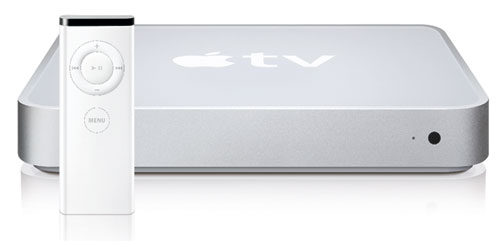
In case you missed it — admittedly, an easy thing to do — Apple's Steve Jobs unveiled the Apple TV in Sept. 2006 as a sort of home theater-connected iPod on steroids. You were expected to connect the petite box, less than eight inches square, to a TV or home theater system. Then iTunes on your computer would sync songs, videos, podcasts, photos, and other digital content to it's hard drive, just as with an iPod or iPhone. You could then play that content through your home entertainment system and/or HDTV.

Apple shipped the first Apple TVs in March 2007 — to deafening silence, aside from the technorati, most of whom held their collective noses. Sales were abysmal. I won't detail all the complaints of that time, but the main issue was that Apple TV didn't do enough, and it did what it did slowly, unreliably, and generally badly.

Over the last 2 1/2 years, Apple has slowly addressed the gripes (most of them). Apple TV is now a pretty good product, and in the fourth quarter of 2008, as the economy was tanking, sales were actually triple those of the fourth quarter of 2007.

The Apple Store's Apple TV page currently shows the product at $229.00 with a 160-GB internal hard drive, the original 40-GB model having been retired. (The fact that the internal drive is so small by today's standards is less of an issue than you might think, because Apple TV easily streams iTunes content that doesn't reside on it.)

In 2007 Mr. Jobs famously (?) spoke of the Apple TV as a "hobby" of the folks at Apple, Inc., not a full-fledged business. The Mac, the iPhone/iPod, the iTunes Store — they're real businesses, Jobs said. Apple TV was something of a household pet in Cupertino. He of course was right about that.

That may change — not real soon, but in the not too distant future. This blogger thinks it will and hopes it does. The key will be that Apple TV is now seen by Apple more as an all-purpose media client, and less as an iPod on steroids.

This paragraph from the Wikipedia article on Apple TV gets at what I mean:

With the "Take Two" software update announced by Steve Jobs at Macworld 2008, Apple TV became capable of acting as a pure stand-alone device, no longer requiring a computer running iTunes on Mac OS X or Windows to stream or sync content to it. Jobs stated, "Apple TV was designed to be an accessory for iTunes and your computer. It was not what people wanted. We learned what people wanted was movies, movies, movies." Users can access the iTunes store directly through Apple TV to purchase movies, music, music videos, and television shows. Customers can also use Apple TV to rent standard or HD-quality movies. Until mid-March 2009, iTunes HD movies could only be purchased from Apple TV.


If your computer goes down, or if iTunes is not running, the only thing you lose is the ability to stream — not sync, but stream — content from it to Apple TV. You can still play your previously synced video, audio, and photo content (as long as it resides on Apple TV's hard drive; if not, Apple TV does want to stream it from iTunes instead). You can still grab content, including HD movies and TV shows, from the iTunes Store directly. You can still play YouTube videos and listen to Internet radio stations (this last being a welcome new feature).

OK, so Apple TV has become a real product, in my eyes at least. Herein, a potpourri of cool stuff about it:

First, there is now a neat iPhone/iPod Touch app called (naturally) Remote (web page here; App Store download link here) that turns your mobile device's touch screen into a way to control an Apple TV. It's free, and it works. It presents the iPhone/iTouch user with an interface very much like the iPod app itself, with the addition of a Control tab that does what Apple TV's Apple Remote does, but more easily and intuitively.

The Control tab in effect turns your touch screen into an Apple TV remote control. You drag your finger along the touch screen, either side-to-side or up and down, to do what the Apple remote (-->) does with its control ring and central Play/Pause/Select button.

The Apple Remote's Menu button, meanwhile, is replaced by a virtual Menu button (<--) in the Remote App — I'll call the app RA for short. The RA > or Exit button brings up various tabs for exiting the Control Tab and accessing "Playlists," an "Artists" list, a "Search" function, and "More": Albums, Audiobooks, Composers, Genres, Movies, Music Videos, Podcasts, Songs, and TV Shows.

In the right-bottom corner is an Options button used to display on your TV Apple TV commands: basically, Start Genius, Add to On-The-Go, Browse Artist, Browse Album, and Cancel.

RA also controls iTunes playback. If (as I do) you have Airport Express units installed on your home network and connected to your home entertainment center(s), RA can tell iTunes to select among those and your computer's own speakers.

In fact, RA seems in some sense to be leveraging the ability of Apple TV to turn itself into an AirTunes device, à la an Airport Express. I don't fully understand what's going on ... but never mind. The important thing is that RA controls Apple TV (or iTunes itself) wirelessly, using WiFi. Unlike with the the infrared Apple Remote, you don't have to be in the same room with Apple TV or a computer running iTunes. That's marvelous. I like to start music playing and wander (with my iPhone) into a different room. RA can direct operations truly remotely, even to the extent of letting me turn up or down the volume when need be, from anywhere in your house.

Another cool thing: RA displays, on the iPhone/iTouch's screen, the cover art of the music you're playing on Apple TV! Cover art also appears next to songs, albums, etc., as you flip through them in RA, looking for something to play.

Here is the take Christopher Breen of Macworld had on RA. (I'm not precisely sure what "Oooh" and "Feh" mean in his lexicon, BTW ... )

* * *


The next item in my Apple TV potpourri is about a neat website, Apple TV Junkie. ATVJ covers Apple TV in depth. I especially like its The More You Know page, where you can learn about such things as:


Check it out!

Friday, November 27, 2009

VOD Video Quality Comparison

In earlier Video On Demand posts, I've talked about using the Netflix Watch Instantly capability to stream movies and TV shows to your computer or — via a TiVo, a Sony PlayStation 3, or any other "Netflix-ready" device — directly to your HDTV screen. I've also talked about using the Amazon Video On Demand store to rent or purchase videos and then watch them in your computer browser or download them to a TiVo or other "Amazon-ready" device.

I haven't said much yet about the ability to rent or buy videos at the iTunes Store, via the iTunes application on your Mac or PC, as opposed to your web browser. The iTunes Store offers video content for iPhones and iPods, for the Apple TV, and for play on your desktop in iTunes.

I recently rented the 1958 classic horror flick The Fly at Amazon and iTunes and compared the quality of the video with that at Netflix. All these are standard-def versions.

Here is how a particularly useful frame of the movie looks in the Netflix version:


In the iTunes version:


And in the Amazon version:


To see what the differences are, you'll need to click on each of these images to enlarge them in your browser window. The best way to do that is to open each in a new tab in the same browser window, then click on each tab in turn to note the rather obvious differences.

First, rapidly alternate between the Netflix and Amazon versions. They're similar in frame size, but the Netflix covers just a tad more of the original 2.35:1 CinemaScope film frame — compare especially the amount of the grid of the depicted window screen that you can see at the left edge of the picture.

The Netflix image is also sharper. Look at the Roman numeral date MCMLVIII in both images. It's a little more legible in the Netflix than in the Amazon.

Now switch to the iTunes version. The MCMLVIII is downright blurry. The frame is stretched vertically to yield a subtly incorrect picture geometry. The left edge of the picture reveals less of the depicted screen than the Netflix version does — about as much as the Amazon version does. Also, the iTunes version looks duller and darker; the reddish brown background color isn't as vibrant.

In other words, the iTunes image is geared to the low available resolution and nonstandard aspect ratio of an iPhone/iPod screen. The subtle vertical stretching allows the image to use more of the mobile device's limited screen area than would otherwise be the case, given that (nearly) the entire width of the original (extremely wide) film frame is being shown.

Most users probably prefer the slight geometric distortion to having wider black bars at the top and bottom of the iPhone/iPod screen, so this is a compromise that makes some sense. However, if you are watching on a big computer monitor, the soft, stretched image looks pretty bad when compared, in full-screen mode on the same monitor, with the Netflix version — which, after all, is free to anyone with a Netflix-ready TV setup and a standard Netflix account.

Meanwhile, the Amazon version is just a tick inferior to the Netflix version, and far preferable to the iTunes version on any reasonably large screen. If you lack a Netflix-ready setup but have one that is Amazon-ready, you will lose little in terms of video quality (though you will have to pay for each rental or purchase).

Strictly speaking, this comparison applies only to this one movie; it may be that Amazon is better than Netflix for other titles. However, I think it likely that iTunes will be generally unable to match either Netflix or Amazon in terms of video quality, simply because it targets iPhones/iPods first, and bigger, higher-resolution viewscreens second.

An exception: HD content. You can buy or rent certain titles in HD from an Apple TV, for use on the Apple TV. I'll deal with that in a subsequent post.

Another exception: standard-def videos from the iTunes Store, when rented directly from an Apple TV (see this Apple Support document). They can have up to 720x480-pixel widescreen resolution, while the same titles rented from a computer or iPhone/iTouch max out at 640x480. (I rented The Fly from my computer.)

This exception applies only to iTunes Store rentals of videos. iStore video purchases are stuck with 640x480 resolution, no matter what device you use to make the purchase. 720x480 supposedly won't play on an iPhone/iTouch, only on an Apple TV. If you bought a video on your Apple TV and later tried to move it to your iPhone, it wouldn't play ... and Apple doesn't want to deal with the customer complaints when that happens.

An aside for techies:

(The main part of the article is done. If you don't want to be bored by a raft of technical detail, you can stop reading now.)

640x480-pixel anamorphic resolution squeezes a 16:9 widescreen picture into a nominally 4:3 video frame that uses "square" pixels: the individual pixels are exactly as wide as they are tall. The decoder expands the frame again into its original 16:9 aspect ratio, a process that is relatively easy when the pixels are square. Of course, after the pixels are "unsqueezed," they're no longer square, but having square pixels prior to the unsqueezing allows the decoding to be done by a processor of quite limited power, such as is found in an iPhone/iTouch.

720x480-pixel anamorphic widescreen, unsqueezed to 16:9, has non-square pixels both for the input to the decoder and for the output, so the strain on processing capacity is much greater — too great for an iPhone/iTouch. But the Apple TV has (somewhat) greater processing capacity, so
720x480-pixel anamorphic widescreen input works with it.

There are
other potential ways in which videos that work on an Apple TV can be incompatible with an iPhone/iTouch. For example, if a video has a bitrate of over 1,500 kbps, iPhone/iTouch won't touch it. iPhone/iTouch can't use videos encoded with bidirectionally predictive frames (B-frames), either. B-frames allow for more compact files and hold down transmitted bitrates. If B-frames were allowed, 1,500 kbps could yield a sharper, more artifact-free image.

But the iPhone/iTouch, because of its tiny, low-resolution screen, can't render any sharper and better images than it does. Plus, higher bitrates require larger memories and faster processors in a decoding device, while B-frames likewise tax the decoding processor and require the frames of displayed video to be held in memory after they have been displayed, "wasting" available memory space. Apple made the compromises that it did in order that the processor speed and memory size of the iPhone/iTouch could be held within reason.

Now, these considerations don't apply at all to Netflix video streaming, for the simple reason that the list of Netflix-ready devices includes no mobile or portable devices.

What about Amazon VOD? Again, Amazon's official list of ways to watch their videos conspicuously fails to mention mobile or portable devices.

In its earlier incarnation as Amazon Unbox, the Amazon VOD service supported Microsoft PlaysForSure portable devices. Those were non-PC devices that were certified by Microsoft to be able to play anything their Windows Media Player app could play on a real computer. PlaysForSure certification was rebranded as "Certified for Windows Vista" in 2007.

Meanwhile, Microsoft had come out with it's own iTouch competitor, the Zune portable media player — and Zune cannot play all
PlaysForSure content!

Remind you of anything? Such as: the iPhone/iPod Touch can't play all the content an Apple TV can play (including HD content).

The message here is that it is as yet extremely difficult — nay, impossible — to stream highest-quality video content that "plays for sure" on all manner of devices that turn out to be price-competitive in a competitive, real-world marketplace.

Wednesday, September 17, 2008

HD TV Shows at iTunes Store

With the recent release of iTunes 8.0, Steve Jobs and company at Apple has also made available, for customers at Apple's iTunes Store, TV shows in high-definition for the first time.

HD episodes of Ugly Betty, Desperate Housewives, The Office, 30 Rock, Monk, Lost, and many other hit series can be purchased for $2.99, $1.00 more than the standard-def versions.

When you click on a "Buy Episode" button in iTunes, if the episode is HD, what you are supposed to be buying and downloading is actually two versions of the show, one HD and the other SD.

I find that there is a bug in Apple's implementation, however. If you use a Shopping Cart at the iTunes Store, rather than 1-Click Shopping, you can't get the HD shows. In my tests, you only get the SD version placed in your cart, not the HD. Then when you click on "Buy Now," the SD version only is downloaded.

Other people have reported online that they don't even get the SD version, just an indication that the show is mysteriously "unavailable."

The solution is to go into iTunes Preferences, under "Store," and click "Buy and download using 1-Click." That deselects "Buy using a Shopping Cart." (Make sure you have emptied your cart before doing this.) Now when you click a "Buy Episode" button, you will get an iTunes dialog asking you to confirm your purchase (unless you have previously told iTunes to disable this message). Once you authorize the purchase, the download will begin immediately of the two versions of the show.

iTunes 8.0 will then have both versions in its library. You can play either one, either in iTunes 8.0 or in QuickTime Player 7.5.5 (which, if you don't already have it, you need to get).

The HD version of the first episode of Monk, Season 7, "Mr. Monk Buys a House," is currently a freebie. It plays with a resolution of 1280 x 720 pixels with a total bit rate of 4541 kbps. (QT Player shows the data rate as being a bit lower: 4107.45 kbits/s.) This is true 720p resolution.

QT Player's numbers for the SD version are 853 x 480 non-square pixels in a 720 x 480 frame, at 1624.86 kbits/s. The SD file for this close-to-one-hour show takes up 509.8 MB, while the HD version uses 1.37 GB — nearly three times the storage.

The HD version plays just fine on my Apple TV, either when synced or streamed, with full resolution that is visibly better than that of the SD version.

Despite what I seem to have read online, it does not appear that iTunes 8.0 is smart enough, if you inadvertently try to sync an HD show to your iPod Touch, to substitute the SD equivalent. Instead, you have to manually arrange to sync the SD version. (I sync TV Shows using a selected playlist; syncing TV Shows by show rather that playlist, however, does not get around this problem.)

This shortfall, though minor, points up the inherent problem with the way Apple is implementing HD. It looks to me as if the only reason to bundle an SD version with an HD show is for the benefit of the iPod. (Maybe some older Macs than my MacBook Pro running Mac OS X 10.5.4 will, like an iPod, refuse to play HD, but I don't know this for a fact.)

If the iPod Touch (or iPhone) could just be updated so that it would play HD versions, downrezzing them as necessary for the coarser screen, Apple could omit the SD version entirely — saving about 20 percent on download time and storage requirements, plus obviating the iTunes Store bug that causes problems when using the Shopping Cart.

Coming alongside the iTunes and QuickTime upgrades was an upgrade (version 2.1) to my iPod Touch software. As part of the upgrade, there was a concurrent upgrade to the iPod's firmware. I wasn't aware that iPods have upgradeable firmware, but since they do, I have to wonder whether they could be made compatible with HD video.

HD video as implemented at the iTunes Store has higher bitrates than the iPod can nominally keep up with, and probably uses B-frames ("bidirectional video frames") to slim down storage requirements. But if the iPod's bitrate limit and allergy to B-frames could be overcome, voila: (albeit downrezzed) HD video!

I can pretty much guarantee that future iPods/iPhones will have it. Is there any hope for current 'Pods?